引言
MariaDB 是一款灰常不錯開源數據庫. 這裡直接用它來解決業務問題.
業務需求:
現在數據庫中表示按照天分表的. 突然我們需要按照月來處理數據.
例如輸入一個玩家id, 查找這個玩家這個月內看了一件事幾次. 我們先搭建一個環境.
操作系統:
Linux version 4.4.0-22-generic (buildd@lgw01-41)
(gcc version 5.3.1 20160413 (Ubuntu 5.3.1-14ubuntu2) )
#40-Ubuntu SMP Thu May 12 22:03:46 UTC 2016
首先安裝 MariaDB數據庫
sudo apt-get install mariadb-server
sudo apt-get install mariadb-client
sudo apt-get install libmariadb2
sudo apt-get install libmariadb-client-lgpl-dev
sudo apt-get install libreoffice-mysql-connector
後面是C訪問 MariaDB驅動. 這裡扯一點, 目前關於MariaDB不懂問題, 搜不見直接當成mysql開始搜.
MariaDB安裝成功後默認是開啟的, 看下面圖描述
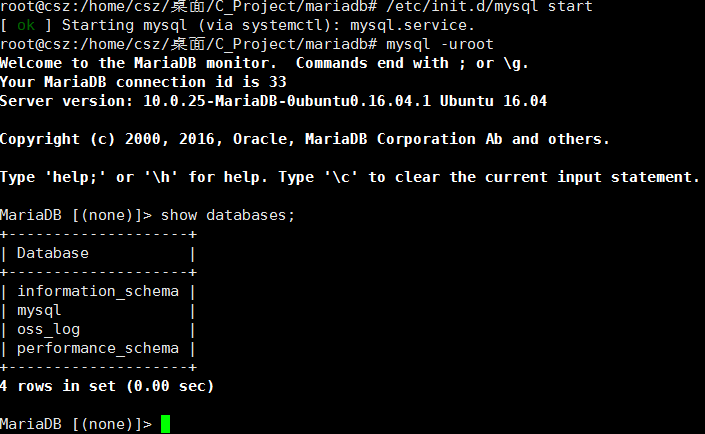
後面搭建測試環境 首先 看 oss_musicelves.sql
-- MySQL dump 10.10
--
-- Host: localhost    Database: oss_log
-- ------------------------------------------------------
-- Server version    5.5.24-tmysql-1.4

/*!40101 SET @OLD_CHARACTER_SET_CLIENT=@@CHARACTER_SET_CLIENT */;
/*!40101 SET @OLD_CHARACTER_SET_RESULTS=@@CHARACTER_SET_RESULTS */;
/*!40101 SET @OLD_COLLATION_CONNECTION=@@COLLATION_CONNECTION */;
/*!40101 SET NAMES utf8 */;
/*!40103 SET @OLD_TIME_ZONE=@@TIME_ZONE */;
/*!40103 SET TIME_ZONE='+00:00' */;
/*!40014 SET @OLD_UNIQUE_CHECKS=@@UNIQUE_CHECKS, UNIQUE_CHECKS=0 */;
/*!40014 SET @OLD_FOREIGN_KEY_CHECKS=@@FOREIGN_KEY_CHECKS, FOREIGN_KEY_CHECKS=0 */;
/*!40101 SET @OLD_SQL_MODE=@@SQL_MODE, SQL_MODE='NO_AUTO_VALUE_ON_ZERO' */;
/*!40111 SET @OLD_SQL_NOTES=@@SQL_NOTES, SQL_NOTES=0 */;

--
-- Table structure for table `oss_musicelves`
--

DROP TABLE IF EXISTS `oss_musicelves`;
CREATE TABLE `oss_musicelves` (
  `record_id` bigint(20) NOT NULL AUTO_INCREMENT,
  `account_id` bigint(20) NOT NULL,
  `server_id` int(11) NOT NULL,
  `char_id` bigint(20) NOT NULL,
  `char_sex` int(11) NOT NULL,
  `type_id` int(11) NOT NULL,
  `timeStamp` datetime NOT NULL DEFAULT '0000-00-00 00:00:00',
  `ptype` int(11) NOT NULL,
  `specifytype` int(11) NOT NULL,
  `childtype` int(11) NOT NULL,
  PRIMARY KEY (`record_id`),
  KEY `idx_specifytype` (`specifytype`)
) ENGINE=InnoDB AUTO_INCREMENT=32 DEFAULT CHARSET=latin1;

--
-- Dumping data for table `oss_musicelves`
--


/*!40000 ALTER TABLE `oss_musicelves` DISABLE KEYS */;
LOCK TABLES `oss_musicelves` WRITE;
INSERT INTO `oss_musicelves` VALUES (1,411948833,84869352,27899597414400801,0,1812,'2016-05-31 14:27:41',0,1,1),(2,1344702709,90964200,30422720614402293,0,1812,'2016-05-31 14:58:26',0,1,1),(3,706409913,90964200,30422720614401465,1,1812,'2016-05-31 14:58:27',0,1,2),(4,706409913,392964857,30422720614401465,1,1812,'2016-05-31 14:58:59',0,2,4),(5,1344702709,392964857,30422720614402293,0,1812,'2016-05-31 14:58:59',0,2,4),(6,706409913,90964200,30422720614401465,1,1812,'2016-05-31 15:04:52',0,1,2),(7,706409913,392964857,30422720614401465,1,1812,'2016-05-31 15:05:54',0,2,4),(8,1344702709,392964857,30422720614402293,0,1812,'2016-05-31 15:05:54',0,2,4),(9,1344702709,90964200,30422720614402293,0,1812,'2016-05-31 15:10:29',0,1,1),(10,706409913,90964200,30422720614401465,1,1812,'2016-05-31 15:10:32',0,1,2),(11,1344702709,392964857,30422720614402293,0,1812,'2016-05-31 15:10:54',0,2,4),(12,3145910262,90964200,29520779366416374,1,1812,'2016-05-31 15:30:00',0,1,1),(13,1372825842,90964200,30173879500803314,1,1812,'2016-05-31 15:30:01',0,1,2),(14,3145910262,392964857,29520779366416374,1,1812,'2016-05-31 15:30:04',0,2,4),(15,1372825842,392964857,30173879500803314,1,1812,'2016-05-31 15:30:04',0,2,4),(16,3145910262,392964857,29520779366416374,1,1812,'2016-05-31 15:34:24',0,2,4),(17,1372825842,392964857,30173879500803314,1,1812,'2016-05-31 15:34:24',0,2,4),(18,706409913,90964200,30422720614401465,1,1812,'2016-05-31 15:40:14',0,1,1),(19,1344702709,90964200,30422720614402293,0,1812,'2016-05-31 15:40:16',0,1,2),(20,3145910262,392964857,29520779366416374,1,1812,'2016-05-31 15:42:19',0,2,4),(21,1372825842,392964857,30173879500803314,1,1812,'2016-05-31 15:42:19',0,2,4),(22,1027763684,90964200,30175730790400484,0,1812,'2016-05-31 16:56:33',1,1,1),(23,1372825842,90964200,30173879500803314,1,1812,'2016-05-31 16:56:50',0,1,2),(24,1372825842,392964857,30173879500803314,1,1812,'2016-05-31 16:57:37',0,2,3),(25,1027763684,392964857,30175730790400484,0,1812,'2016-05-31 16:57:37',1,2,3),(26,1372825842,392964857,30173879500803314,1,1812,'2016-05-31 17:04:33',0,2,3),(27,1027763684,392964857,30175730790400484,0,1812,'2016-05-31 17:04:33',1,2,3),(28,1027763684,90964200,30175730790400484,0,1812,'2016-05-31 17:14:15',1,1,2),(29,1372825842,392964857,30173879500803314,1,1812,'2016-05-31 17:14:50',0,2,3),(30,1027763684,392964857,30175730790400484,0,1812,'2016-05-31 17:14:50',1,2,3),(31,751699770,90964200,30175199027201850,1,1812,'2016-05-31 18:14:59',1,1,1);
UNLOCK TABLES;
/*!40000 ALTER TABLE `oss_musicelves` ENABLE KEYS */;
/*!40103 SET TIME_ZONE=@OLD_TIME_ZONE */;

/*!40101 SET SQL_MODE=@OLD_SQL_MODE */;
/*!40014 SET FOREIGN_KEY_CHECKS=@OLD_FOREIGN_KEY_CHECKS */;
/*!40014 SET UNIQUE_CHECKS=@OLD_UNIQUE_CHECKS */;
/*!40101 SET CHARACTER_SET_CLIENT=@OLD_CHARACTER_SET_CLIENT */;
/*!40101 SET CHARACTER_SET_RESULTS=@OLD_CHARACTER_SET_RESULTS */;
/*!40101 SET COLLATION_CONNECTION=@OLD_COLLATION_CONNECTION */;
/*!40111 SET SQL_NOTES=@OLD_SQL_NOTES */;
這個 oss_musicelves.sql 文件主要功能是創建 oss_musicelves數據庫, 並填充數據.
還有一個 搭建環境 的 腳本 mariadb_test.sql 和上一個sql文件放在同一個目錄下.
# 創建一個測試數據庫
create database oss_log;

# 進入oss_log 數據庫
use oss_log;

# 創建 oss_musicelves 數據庫, 並導入數據
source oss_musicelves.sql;

# 批量創建表和數據
create table 2016_6_1_oss_musicelves select * from oss_musicelves;
create table 2016_6_2_oss_musicelves select * from oss_musicelves;
create table 2016_6_3_oss_musicelves select * from oss_musicelves;
create table 2016_6_4_oss_musicelves select * from oss_musicelves;
create table 2016_6_5_oss_musicelves select * from oss_musicelves;
create table 2016_6_9_oss_musicelves select * from oss_musicelves;
create table 2016_6_10_oss_musicelves select * from oss_musicelves;
create table 2016_6_12_oss_musicelves select * from oss_musicelves;

# 查詢表是否創建成功
show tables;

# 這裡處理 拿到的數據
select distinct table_name from information_schema.columns where table_name like '2016_6_%_oss_musicelves';
直接放在 MariaDB控制台中直接刷進去. 搭建的具體環境如下
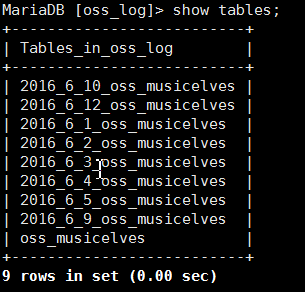
到這裡環境基本搭建好了. MariaDB入門等等, 完全可以當做mysql 學習溫故一遍.
前言
上面問題就是 原本 是 select * from oss_musicelves; 就可以解決的問題.
這裡 需要 輸入年和月 外加一些特殊條件 . select * from %_%_%_oss_musicelves; 解決. 單純用sql腳本也可以解決.非常復雜.用的不熟.
這裡首先通過 shell 腳本處理
touch getmouths.sh
chmod +x getmouths.sh
vi getmouths.sh
具體的腳本 內容 如下
#!/bin/sh

#得到輸入的玩家ptid
if [ $# -lt 1 ]
then
    echo "uage: $0 [ptid]"
    exit -1
fi
ptid=$1

mouth=$(date +%m | sed s'/^0//')
#第一個參數是月份
if [ $# -ge 2 ]
then
    mouth=$2
fi

#第二個參數是年
year=$(date +%Y)
if [ $# -ge 3 ]
then
    year=$3
fi

#得到查詢的隨機表名
tbname="\"${year}_${mouth}_%_oss_musicelves\""

#這裡得到mysql 中所有合法表名
rm -rf __tmp
touch __tmp

#開始查詢數據庫了, 需要以root權限啟動這個腳本
mysql -e "select distinct table_name from information_schema.columns where table_name like $tbname" | awk 'NR>1' | while read name
do
    mysql -e "select count(*) from oss_log.$name where specifytype = 1 and char_id = $ptid" | awk 'NR>1' | while read cut
    do
        echo "$name : $cut"
        echo $cut >> __tmp
        break
    done
done

#統計表裡面的數據
sum=$(cat __tmp | awk '{s+=$1} END {print s}')
rm -rf __tmp

# 最後輸出統計結果
echo "$year-$mouth sum: $sum"
使用腳本 截圖
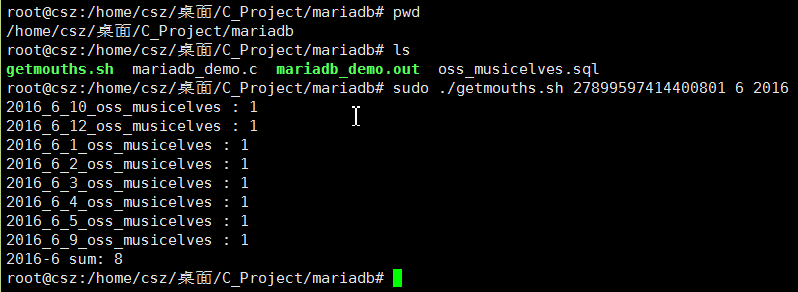
通過shell可以完成 我們的需求. Linux上shell真好用. window的bat不好用.
正文
第一部分 : 讓C調用MariaDB跑通
先看 測試Demo mariadb_demo.c
#include <stdio.h>
#include <stdlib.h>
#include <mysql.h>

/*
 * 第一個 mariadb程序
 */
int main(int argc, char *argv[]) {
    // 創建數據連接對象
    MYSQL *con = mysql_init(NULL);
      if (con == NULL) {
        fprintf(stderr, "%s\n", mysql_error(con));
        exit(EXIT_FAILURE);
      }

      if (!mysql_real_connect(con, "localhost", "root", "", NULL, 0, NULL, 0)) {
        fprintf(stderr, "%s\n", mysql_error(con));
         mysql_close(con);
         exit(EXIT_FAILURE);
      }

      if (mysql_query(con, "show databases;")) {
        fprintf(stderr, "%s\n", mysql_error(con));
        mysql_close(con);
        exit(EXIT_FAILURE);
      }

    puts("mariadb is connect and run succesed!");
    mysql_close(con);

    return 0;
}
具體的編譯 命令
su root
gcc -Wall -ggdb2 -I/usr/include/mariadb -o mariadb_demo.out mariadb_demo.c -lmysqlclient
./mariadb_demo.out
運行結果 如下

到這裡基本C 調用 MariaDB 基本流程跑通了. 但是很不爽. 只能通過root用戶使用.
那我們改變這裡不爽. 進入第二部分. 擴展資料 c in mariadb http://stackoverflow.com/questions/17265471/using-mariadb-in-c
第二部分 : 通過普通用戶完成業務需求.
先創建普通用戶 csz, 密碼是 1413222, 並並且給其 select 讀權限.
su root
mysql

drop user csz;
create user 'csz'@'%' identified by '13142222';
grant select on *.* to 'csz'@'%';
# 立即刷新
flush privileges;
後面登錄試試
mysql -ucsz -p1314222 -h127.0.0.1

主要是mariadb默認關閉遠程訪問. 後面我們開啟安全訪問模式試試
su root
/etc/init.d/mysql stop
mysqld_safe --skip-grant-tables
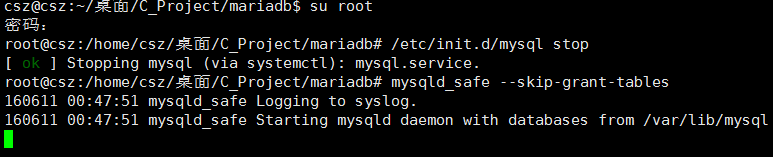
後面再開啟一個會話 . 重新輸入 mysql -ucsz -p1314222 -h127.0.0.1 , 解決可以了
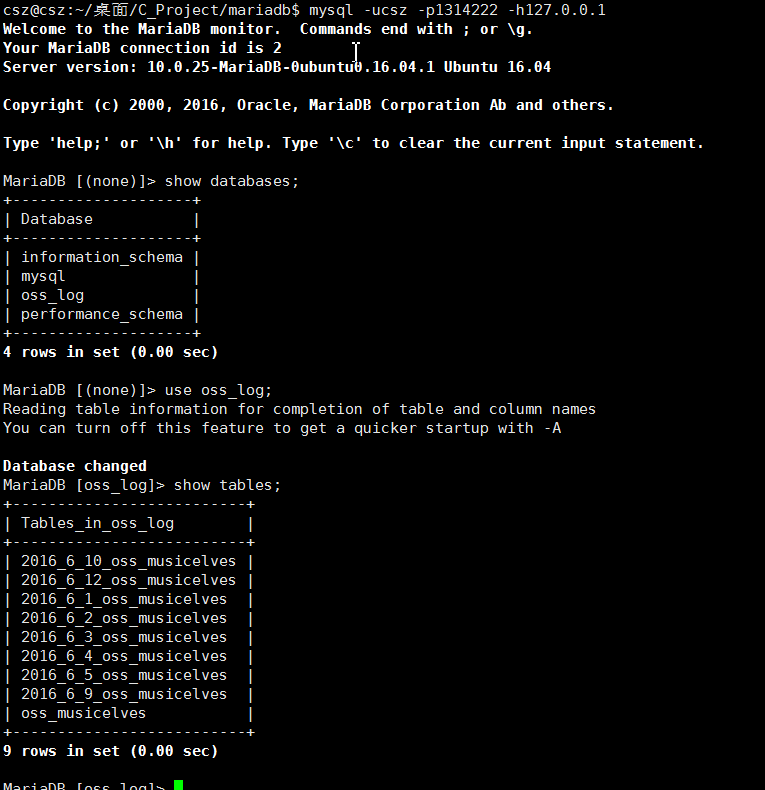
到這裡 通過新建的 csz 用戶訪問成功. 好了. 那我們開始寫一個 msyql c 代碼處理我們的業務. 按照月來訪問. 那我們開始寫代碼.代碼的總的思路是拼接一個這樣的串
#目標拼接 串內容
select sum(c) from (
select count(*) as c from 2016_6_1_oss_musicelves where specifytype=1 and char_id = 30422720614402293
union all
select count(*) from 2016_6_2_oss_musicelves where specifytype=1 and char_id = 30422720614402293
union all
select count(*) from 2016_6_3_oss_musicelves where specifytype=1 and char_id = 30422720614402293
union all
select count(*) from 2016_6_4_oss_musicelves where specifytype=1 and char_id = 30422720614402293
union all
select count(*) from 2016_6_5_oss_musicelves where specifytype=1 and char_id = 30422720614402293
union all
select count(*) from 2016_6_9_oss_musicelves where specifytype=1 and char_id = 30422720614402293
union all
select count(*) from 2016_6_10_oss_musicelves where specifytype=1 and char_id = 30422720614402293
union all
select count(*) from 2016_6_12_oss_musicelves where specifytype=1 and char_id = 30422720614402293
) as t;
具體看 getmouths.c 文件 內容
#include <stdio.h>
#include <stdlib.h>
#include <time.h>
#include <mysql.h>

#define _INT_BUF (4098)
// 得到查詢數據表內容
#define _STR_SQLTABLES \
    "select distinct table_name from information_schema.columns where table_name like '%d_%d_%%_oss_musicelves'"
#define _STR_SQLSELECT \
    "select count(*) as c from %s where specifytype=1 and char_id = %lld"

// 基礎的mariadb 錯誤關閉函數
static inline void _err_mariadb(MYSQL *con) {
    fprintf(stderr, "_err_mariadb error: %s\n", mysql_error(con));
    mysql_close(con);
    exit(EXIT_FAILURE);
}

/*
 * 處理 oss_musicelves 一個月的所有表.
 */
int main(int argc, char* argv[]) {
    long long ptid;
    time_t rt = time(NULL);
    struct tm *pt = localtime(&rt);
    int year = pt->tm_year + 1900;
    int mouth = pt->tm_mon + 1;

    // 先簡單檢測輸入
    if(argc <= 1) {
        fprintf(stderr, "%s [ptid] [mouth] [year]\n", argv[0]);
        exit(EXIT_FAILURE);
    }

    // 先得到 ptid 數據
    ptid = atoll(argv[1]);
    // 得到當前月份
    if(argc >= 3)
        mouth = atoi(argv[2]);
    // 得到當前年份
    if(argc >= 4)
        year = atoi(argv[3]);
    // 簡單檢測結果是否合法
    if(ptid < 0 || mouth <=0 || mouth>12 || year<1900) {
        fprintf(stderr, "%s %lld %d %d is error!\n", argv[0], ptid, mouth, year);
        exit(EXIT_FAILURE);
    }

    // 輸出結果
    printf("%s %lld %d %d start run!\n", argv[0], ptid, mouth, year);

    // 開始用mysql 訪問我們需要訪問的數據結果了
    MYSQL *con = mysql_init(NULL);
    if(con == NULL) {
      fprintf(stderr, "mysql_init error: %s\n", mysql_error(con));
      exit(EXIT_FAILURE);
     }
      if(!mysql_real_connect(con, "127.0.0.1", "csz", "1314222", "oss_log", 0, NULL, 0))
        _err_mariadb(con);

    char sqls[_INT_BUF];
    int sqlen = 0;
    sprintf(sqls, _STR_SQLTABLES, year, mouth);
    if(mysql_query(con, sqls))
        _err_mariadb(con);

    // 開始得到結果
    MYSQL_RES *ret = mysql_store_result(con);
    if(NULL == ret)
        _err_mariadb(con);
    MYSQL_ROW row;
    int i = 0, nr = 0;
    while(!!(row = mysql_fetch_row(ret))) {
        if(i == 0) {
            sqlen = sprintf(sqls, "select sum(c) from (\n" _STR_SQLSELECT, row[0], ptid);
            i = 1;
            continue;
        }
        // 後面正常拼接
        nr = sprintf(sqls + sqlen, "\nunion all\n" _STR_SQLSELECT, row[0], ptid);
        if((sqlen += nr) >= _INT_BUF) {
            fprintf(stderr, "sprintf while %d too length.\n", sqlen);
            goto __return_free;
        }
    }
    if(i == 0)     {
        printf("sum %lld %d/%d: 0\n", ptid, year, mouth);
        goto __return_free;
    }

    // 這裡處理有的數據
    nr = sprintf(sqls + sqlen, "\n) as t;");
    if((sqlen += nr) >= _INT_BUF) {
        fprintf(stderr, "sprintf end %d too length.\n", sqlen);
        goto __return_free;
    }
    // 內存用完了就直接釋放
    mysql_free_result(ret);
    ret = NULL;


    printf("sql : \n\t%s\n", sqls);
    // 開始輸出統計結果
    if(mysql_query(con, sqls))
        _err_mariadb(con);
    if((ret = mysql_store_result(con))==NULL)
        _err_mariadb(con);
    //得到結果直接返回
    if(!!(row=mysql_fetch_row(ret)))
        printf("sum %lld %d/%d: %s\n", ptid, year, mouth, row[0]);
    else
        puts("select is empty!");


__return_free:
    // 釋放用過的內存
    mysql_free_result(ret);
    // 關閉打開的 數據庫訪問對象
      mysql_close(con);
    return 0;
}
編譯命令
gcc -Wall -ggdb2 -I/usr/include/mariadb -o getmouths.out getmouths.c -lmysqlclient
最終運行結果是
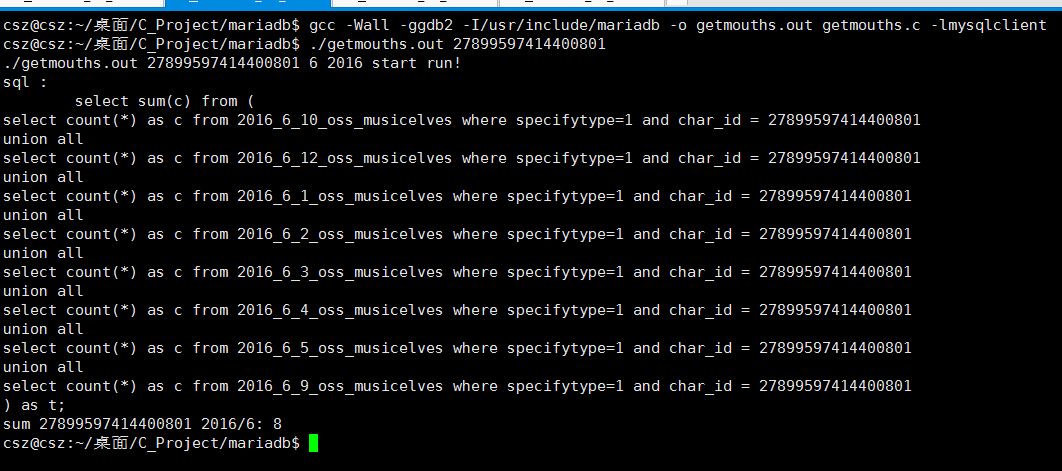
如果想詳細了解關於mariadb c驅動的api使用, 可以參照老外寫的很好理解.
mysqlc demo http://zetcode.com/db/mysqlc/
到這裡就結束了, 關於C 訪問數據庫能力也基本打通了.
後記
錯誤是難免, 歡迎學習進步~~~ 未來什麼都不確定, 可以確定是沒有未來, 只有現在還在裝逼 .