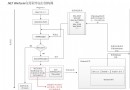
先放上gof中對於迭代器模式的介紹鎮樓
類圖如下
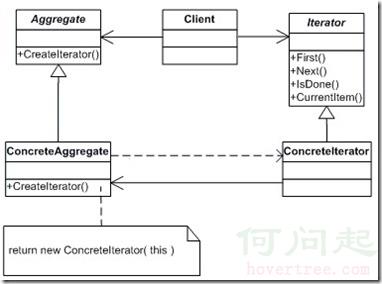
在日常工作中,我們組負責的系統會經常與外部系統進行大量數據交互,大量數據交互的載體是純文本文件,我們需要解析文件每一行的數據,處理後入庫,所以在我們系統中就有了如下的代碼了。
        public void ParseFile(string filePath, Encoding fileEncoding)
        {
            FileStream fs = null;
            try
            {
                fs = new FileStream(filePath, FileMode.Open, FileAccess.Read);
                using (var sr = new StreamReader(fs, fileEncoding))
                {
                    fs = null;
                    string line = null;
                    while ( (line = sr.ReadLine()) != null )
                    {
                        //解析改行數據
                    }
                }
            }
            finally
            {
                if (fs != null)
                {
                    fs.Close();
                }
            }
        }
這樣子的代碼存在兩個問題:1-無法進行單元測試 2-無法擴展。
實際上這兩個問題的根源都是因為直接依賴了文件系統。在我們的業務處理邏輯中,我們實際關心的是內容,而不是內容從何而來。如果內容格式不發生更改,業務邏輯代碼就應該保持不變。文件作為內容的載體,可能會變為socket或者nosql數據庫,如果這種情況一旦發生,難道把業務代碼copy一份出來,然後把從文件讀取數據改為從socket或者nosql讀取?在進行單元測試時,我希望可以提供一個字符串數組就能對我的業務邏輯進行測試,而不是要提供一個文件。那麼好了,我們要做的事情是將具體的數據來源隱藏掉,給業務代碼提供一組API,讓業務代碼使用這組API可以獲取到它所關心的內容。換句話說,我要提供一種方法來讓人訪問數據載體的元素,但是我並不像把數據載體暴露出來,這個目的簡直跟迭代器模式的動機一毛一樣呀。
在文件解析場景中,文件就是迭代器模式中提到的聚合對象,文件中的每一行就是聚合對象的內部元素。這樣我們先定義出迭代器接口和具體的文件迭代器
 public interface IIterator
     {
         void First();
         void Next();
         bool IsDone();
         string GetCurrentItem();
     }
 class FileIterator : IIterator
     {
         private readonly StreamReader _reader = null;
         private string _current = null;
         public FileIterator(string filePath, Encoding encoding)
         {
             _reader = new StreamReader(new FileStream(filePath, FileMode.Open, FileAccess.Read), encoding);
         }

         public void First()
         {
             Next();
         }

         public void Next()
         {
             _current = _reader.ReadToEnd();
         }

         public bool IsDone()
         {
             return _current == null;
         }

         public string GetCurrentItem()
         {
             return _current;
         }
     }
而此時我們的業務代碼變成了這樣
 public void ParseFile(IIterator iterator)
         {
             for (iterator.First(); !iterator.IsDone(); iterator.Next())
             {
                 var current = iterator.GetCurrentItem();
                 Console.WriteLine(current);
                 //對數據進行處理
             }
         }
通過迭代器模式,業務代碼對數據載體一無所知,按照給定的一組API,獲取想要的數據即可,當進行單元測試時,我們可以提供一個基於數組的迭代器,對業務代碼進行UT
class ArrayIterator:IIterator
    {
        private int _currentIndex = -1;
        private readonly string[] _array = null;

        public ArrayIterator(string[] array)
        {
            _array = array;
        }

        public void First()
        {
            Next();
        }

        public void Next()
        {
            _currentIndex++;
        }

        public bool IsDone()
        {
            return _currentIndex >= _array.Length;
        }

        public string GetCurrentItem()
        {
            return _array[_currentIndex];
        }
    }
細心的讀者已經發現了,在我上面實現的文件迭代器是存在問題的,因為我在構造函數裡打開了文件流,但是並沒有關閉它,所以按照C#裡的標准做法,文件迭代器要實現 IDisposable接口,我們還要實現一個標准的Dispose模式,我們的文件迭代器就變成了這樣。
 class FileIterator : IIterator,IDisposable
     {
         private StreamReader _reader = null;
         private string _current = null;
         private bool _disposed = false;
         private FileStream _fileStream = null;
         private readonly string _filePath = null;
         private readonly Encoding _encoding = null;
         public FileIterator(string filePath, Encoding encoding)
         {
             _filePath = filePath;
             _encoding = encoding;
         }

         public void First()
         {
             //原先在構造函數裡實例化StreamReader不太合適,轉移到First方法裡
             _fileStream = new FileStream(_filePath, FileMode.Open, FileAccess.Read);
             _reader = new StreamReader(_fileStream, _encoding);
             _fileStream = null;
             Next();
         }

         public void Next()
         {
             _current = _reader.ReadToEnd();
         }

         public bool IsDone()
         {
             return _current == null;
         }

         public string GetCurrentItem()
         {
             return _current;
         }

         public void Dispose()
         {
             Dispose(true);
             GC.SuppressFinalize(this);
         }

         protected virtual void Dispose(bool disposing)
         {
             if (_disposed)
             {
                 return;
             }
             if (disposing)
             {
                 if (_reader != null)
                 {
                     _reader.Dispose();
                 }
                 if (_fileStream != null)
                 {
                     _fileStream.Dispose();
                 }
             }
             _disposed = true;
         }

         ~FileIterator()
         {
             Dispose(false);
         }
     }
配合這次改造,業務代碼也要做一些改變
 public void ParseFile(IIterator iterator)
         {
             try
             {
                 for (iterator.First(); !iterator.IsDone(); iterator.Next())
                 {
                     var current = iterator.GetCurrentItem();
                     Console.WriteLine(current);
                     //對數據進行處理
                 }
             }
             finally
             {
                 var disposable = iterator as IDisposable;
                 if (disposable != null)
                 {
                     disposable.Dispose();
                 }
             }
         }
使用迭代器模式,成功解耦了對文件系統的依賴,我們可以隨心所欲地進行單元測試,數據載體的變動再也影響不到業務代碼。
上面的章節,我實現了經典gof迭代器模式,實際上,迭代器模式的應用是如此的普遍,以至於有些語言已經提供了內置支持,在C#中,與迭代器有關的有foreach關鍵字,IEnumerable,IEnumerable<T>,IEnumerator,IEnumerator<T>四個接口,看起來有四個接口,實際上是2個,只是因為在 C#2.0版本之前未提供泛型支持,在這裡僅對兩個泛型接口進行討論。
在C#中,接口IEnumerator<T>就是迭代器,對應上面的Iterator,而IEnumerable<T>接口就是聚合對象,對應上面的Aggregate。在IEnumerable<T>中只定義了一個方法
public Interface IEnumerable<T>
{
    IEnumerator<T> GetEnumerator();
}
而foreach關鍵字c#專門為了遍歷迭代器才出現的,我面試別人的時候,特別喜歡問這樣一個問題:“滿足什麼條件的類型實例才可以被foreach遍歷?"看起來正確答案應該是實現了IEnumerable<T>接口的類型,實際上C#並不要求類型實現IEnumerable<T>接口,只要類型中定義了public IEnumerator<T> GetEnumerator()接口即可。
對於IEnumerator<T>接口,微軟已經想到了迭代器中可能會用到非托管對象(實際上微軟剛開始忽略了這個事情,所以最初的非泛型接口IEnumerator並沒有繼承IDisposable接口,直到2.0後才讓泛型接口IEnumerator<T>繼承了IDisposable),所以它的定義是這樣子的。
public interface IEnumerator<out T> : IDisposable, IEnumerator
{
        new T Current {get;}
}

public interface IEnumerator
{
    bool MoveNext();

    Object Current {get;}

    void Reset();
}
在C#的IEnumerator<T>中,實際上將gof經典設計中的First(),IsDone()和Next()三個方法全都合並到了MoveNext()方法中,第一次迭代前現調用MoveNext(),並通過返回值判斷迭代是否結束,還額外提供了一個Reset方法來重置迭代器。當我們使用foreach寫出遍歷一個對象的代碼時,編譯器會將我們的代碼進行轉換。比如我們現在要遍歷一個32位整型List
List<int> list = new List<int> {0,1,2,3,4};
foreach (var item in list)
{
   Console.WriteLine(item);
}
編譯時編譯器會將代碼變成類似下面這樣
List<int> list = new List<int> {0,1,2,3,4};
using (var enumerator = list.GetEnumerator())
{
        while (enumerator.MoveNext())
        {
            Console.WriteLine(enumerator.Current);
        }
}
既然C#中已經內置了迭代器接口,我們就沒有必要定義自己的IIterator接口了,直接使用IEnumerable<T>和IEnumerator<T>接口即可。
 class FileEnumerable : IEnumerable<string>
    {
        private readonly string _filePath;
        private readonly Encoding _fileEncoding;
        public FileEnumerable(string filePath, Encoding fileEncoding)
        {
            _filePath = filePath;
            _fileEncoding = fileEncoding;
        }
        public IEnumerator<string> GetEnumerator()
        {
            return new FileEnumerator(_filePath,_fileEncoding);
        }

        IEnumerator IEnumerable.GetEnumerator()
        {
            return this.GetEnumerator();
        }
    }
public class FileEnumerator : IEnumerator<string>
    {
        private string _current;
        private FileStream _fileStream;
        private StreamReader _reader;
        private readonly string _filePath;
        private readonly Encoding _fileEncoding;
        private bool _disposed = false;
        private bool _isFirstTime = true;
        public FileEnumerator(string filePath, Encoding fileEncoding)
        {
            _filePath = filePath;
            _fileEncoding = fileEncoding;
        }
        public string Current
        {
            get { return _current; }
        }

        object IEnumerator.Current
        {
            get { return Current; }
        }

        public void Dispose()
        {
            Dispose(true);
            GC.SuppressFinalize(this);
        }

        protected virtual void Dispose(bool disposing)
        {
            if (_disposed)
            {
                return;
            }
            if (disposing)
            {
                if (_reader != null)
                {
                    _reader.Dispose();
                }
                if (_fileStream != null)
                {
                    _fileStream.Dispose();
                }
            }
            _disposed = true;
        }

        public bool MoveNext()
        {
            if (_isFirstTime)
            {
                _fileStream = new FileStream(_filePath, FileMode.Open, FileAccess.Read);
                _reader = new StreamReader(_fileStream, _fileEncoding);
                _fileStream = null;
                _isFirstTime = false;
            }
            return (_current = _reader.ReadLine()) != null;
        }

        public void Reset()
        {
            throw new NotImplementedException();
        }

        ~FileEnumerator()
        {
            Dispose(false);
        }
    }
而此時我們的業務代碼變成了這樣子
public void ParseFile(IEnumerable<string> aggregate)
        {
            foreach (var item in aggregate)
            {
                Console.WriteLine(item);
                // //對數據進行處理
            }
        }
在進行單元測試時,我可以直接傳遞一個字符串數組進去了。
看起來我們對於代碼的重構已經完美了,但是實際上C#對於迭代器的內置支持要更徹底,在上面,我們必須要自己寫一個實現了IEnumerator<T>接口的類型,這個工作雖然不難,但是還是有點繁瑣的,C# 針對迭代器模式,提供了yield return和yield break來幫助我們更快更好的實現迭代器模式。下面是代碼重構的最終版本,我們無需自己定義FileEnumerator類了
 class FileEnumerable : IEnumerable<string>
    {
        private readonly string _filePath;
        private readonly Encoding _fileEncoding;
        public FileEnumerable(string filePath, Encoding fileEncoding)
        {
            _filePath = filePath;
            _fileEncoding = fileEncoding;
        }
        public IEnumerator<string> GetEnumerator()
        {
            FileStream fileStream = null;
            try
            {
                fileStream = new FileStream(_filePath, FileMode.Open, FileAccess.Read);
                using (var reader = new StreamReader(fileStream, _fileEncoding))
                {
                    fileStream = null;
                    string line = null;
                    while ((line = reader.ReadLine()) != null)
                    {
                        yield return line;
                    }
                    yield break;
                }
            }
            finally
            {
                if (fileStream != null)
                {
                    fileStream.Dispose();
                }
            }

        }

        IEnumerator IEnumerable.GetEnumerator()
        {
            return this.GetEnumerator();
        }
    }
這裡編譯器會根據我們的代碼,結合yield return和yield break來幫助我們生存一個實現了IEnumerator<string>接口的類型出來。
關於Dispose模式,和yield return,yield break本篇不做過多展開,有興趣的可以找下資料,msdn會告訴你