服務號和訂閱號 URL配置 創建菜單 查詢、刪除菜單 接受消息 發送消息(圖文、菜單事件響應) 示例Demo下載 後記
最近公司在做微信開發,其實就是接口開發,網上找了很多資料,當然園友也寫了很多教程,但都是理論說了一大堆,實用指導或代碼很少。如果你自己仔細研究下,其實就那麼點東西,C#實現起來也很簡單,原本不想寫這篇文章的,但是本人當時摸索走了很多彎路,這邊總結下,希望初次接觸微信公眾平台的朋友別像當時的我一樣。
自己動手,豐衣足食。
服務號是公司申請的微信公共賬號,訂閱號是個人申請的,我個人也申請了一個,不過沒怎麼用。
服務號
1個月(30天)內僅可以發送1條群發消息。 發給訂閱用戶(粉絲)的消息,會顯示在對方的聊天列表中。 在發送消息給用戶時,用戶將收到即時的消息提醒。 服務號會在訂閱用戶(粉絲)的通訊錄中。 可申請自定義菜單。
訂閱號
每天(24小時內)可以發送1條群發消息。 發給訂閱用戶(粉絲)的消息,將會顯示在對方的訂閱號文件夾中。 在發送消息給訂閱用戶(粉絲)時,訂閱用戶不會收到即時消息提醒。 在訂閱用戶(粉絲)的通訊錄中,訂閱號將被放入訂閱號文件夾中。 訂閱號不支持申請自定義菜單。
啟用開發模式需要先成為開發者,而且編輯模式和開發模式只能選擇一個,進入微信公眾平台-開發模式,如下:
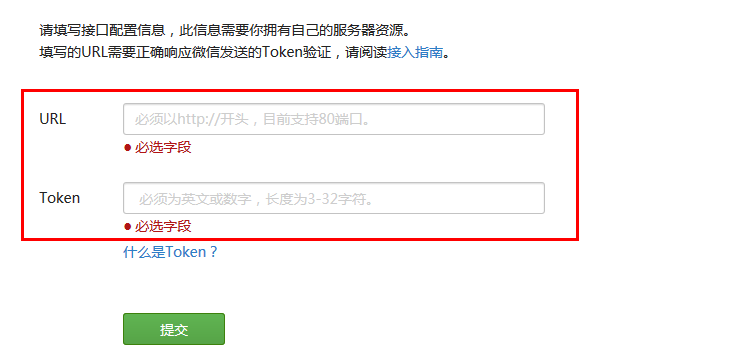
需要填寫url和token,當時本人填寫這個的時候花了好久,我本以為填寫個服務器的url就可以了(80端口),但是不行,主要是沒有仔細的閱讀提示信息,所以總是提示

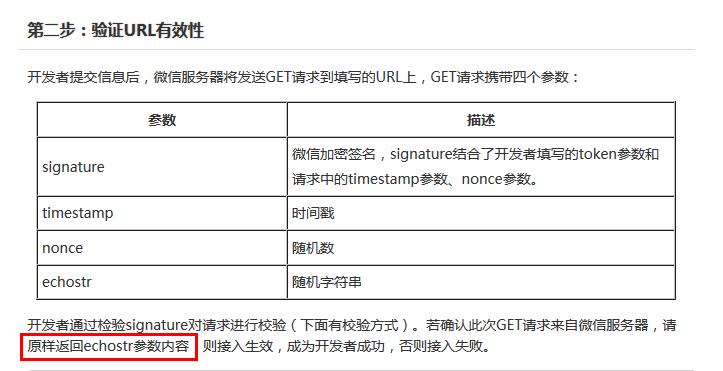
從上面可以看出,點擊提交後微信會向我們填寫的服務器發送幾個參數,然後需要原樣返回出來,所以在提交url的時候,先在服務器創建接口測試返回echostr參數內容。代碼:
01.1 //成為開發者url測試,返回echoStr
02. 2 public void InterfaceTest()
03. 3 {
04. 4 string token = "填寫的token";
05. 5 if (string.IsNullOrEmpty(token))
06. 6 {
07. 7 return;
08. 8 }
09. 9
10.10 string echoString = HttpContext.Current.Request.QueryString["echoStr"];
11.11 string signature = HttpContext.Current.Request.QueryString["signature"];
12.12 string timestamp = HttpContext.Current.Request.QueryString["timestamp"];
13.13 string nonce = HttpContext.Current.Request.QueryString["nonce"];
14.14
15.15 if (!string.IsNullOrEmpty(echoString))
16.16 {
17.17 HttpContext.Current.Response.Write(echoString);
18.18 HttpContext.Current.Response.End();
19.19 }
20.20 }
在一般處理程序ashx的ProcessRequest的方法內調用上面的方法,url填寫的就是這個ashx的服務器地址,token是一個服務器標示,可以隨便輸入,代碼中的token要和申請填寫的一致,成為開發者才能做開發。
我們添加一些微信服務號,聊天窗口下面有些菜單,這個可以在編輯模式簡單配置,也可以在開發模式代碼配置。微信公眾平台開發者文檔:http://mp.weixin.qq.com/wiki/index.php?title=自定義菜單創建接口,可以看到創建菜單的一些要點,下面的使用網頁調試工具調試該接口,只是調試接口是否可用,並不是直接創建菜單的,菜單分為兩種:
click: 用戶點擊click類型按鈕後,微信服務器會通過消息接口推送消息類型為event 的結構給開發者(參考消息接口指南),並且帶上按鈕中開發者填寫的key值,開發者可以通過自定義的key值與用戶進行交互。 view: 用戶點擊view類型按鈕後,微信客戶端將會打開開發者在按鈕中填寫的url值 (即網頁鏈接),達到打開網頁的目的,建議與網頁授權獲取用戶基本信息接口結合,獲得用戶的登入個人信息。
click菜單需要填一個key,這個是在我們菜單點擊事件的時候會用到,view只是一個菜單超鏈接。菜單數據是json格式,官網是php示例,其實C#實現起來也很簡單,就是post發送一個json數據,示例代碼:
01.1 public partial class createMenu : System.Web.UI.Page
02. 2 {
03. 3 protected void Page_Load(object sender, EventArgs e)
04. 4 {
05. 5 FileStream fs1 = new FileStream(Server.MapPath(".")+"\\menu.txt", FileMode.Open);
06. 6 StreamReader sr = new StreamReader(fs1, Encoding.GetEncoding("GBK"));
07. 7 string menu = sr.ReadToEnd();
08. 8 sr.Close();
09. 9 fs1.Close();
10.10 GetPage("https://api.weixin.<;a class="keylink" href="http://www.it165.net/qq/" target="_blank">qq.com/cgi-bin/menu/create?access_token=access_token", menu);
11.11 }
12.12 public string GetPage(string posturl, string postData)
13.13 {
14.14 Stream outstream = null;
15.15 Stream instream = null;
16.16 StreamReader sr = null;
17.17 HttpWebResponse response = null;
18.18 HttpWebRequest request = null;
19.19 Encoding encoding = Encoding.UTF8;
20.20 byte[] data = encoding.GetBytes(postData);
21.21 // 准備請求...
22.22 try
23.23 {
24.24 // 設置參數
25.25 request = WebRequest.Create(posturl) as HttpWebRequest;
26.26 CookieContainer cookieContainer = new CookieContainer();
27.27 request.CookieContainer = cookieContainer;
28.28 request.AllowAutoRedirect = true;
29.29 request.Method = "POST";
30.30 request.ContentType = "application/x-www-form-urlencoded";
31.31 request.ContentLength = data.Length;
32.32 outstream = request.GetRequestStream();
33.33 outstream.Write(data, 0, data.Length);
34.34 outstream.Close();
35.35 //發送請求並獲取相應回應數據
36.36 response = request.GetResponse() as HttpWebResponse;
37.37 //直到request.GetResponse()程序才開始向目標網頁發送Post請求
38.38 instream = response.GetResponseStream();
39.39 sr = new StreamReader(instream, encoding);
40.40 //返回結果網頁(html)代碼
41.41 string content = sr.ReadToEnd();
42.42 string err = string.Empty;
43.43 Response.Write(content);
44.44 return content;
45.45 }
46.46 catch (Exception ex)
47.47 {
48.48 string err = ex.Message;
49.49 return string.Empty;
50.50 }
51.51 }
52.52 }
menu.text裡面的內容就是json示例菜單,大家可以從示例復制下來,按照你的需要修改一些就行了。
關於access_token,其實就是一個請求標示,獲取方式:https://api.weixin.qq.com/cgi-bin/token?grant_type=client_credential&appid=appid&secret=secret;appid和secret是開發者標示,在你的信息裡面可以看到,通過這個鏈接返回一個json數據,就可以得到access_token值。
需要注意的是:access_token有一定的時效性,失效的話就需要重新獲取下,這個在本機就可以創建,不需要上傳到服務器,創建菜單正確,返回{"errcode":0,"errmsg":"ok"}提示信息。這邊就不截圖了,大家試下就可以看到效果,一般創建菜單是一到兩分鐘生效,實在不行就重新關注下。
查詢和刪除菜單也很簡單,只不過是get請求,不需要傳數據,看下示例代碼:
01.1 public partial class selectMenu : System.Web.UI.Page
02. 2 {
03. 3 protected void Page_Load(object sender, EventArgs e)
04. 4 {
05. 5 GetPage("https://api.weixin.qq.com/cgi-bin/menu/get?access_token=access_token");
06. 6 //GetPage("https://api.weixin.qq.com/cgi-bin/menu/delete?access_token=access_token");
07. 7 }
08. 8 public string GetPage(string posturl)
09. 9 {
10.10 Stream instream = null;
11.11 StreamReader sr = null;
12.12 HttpWebResponse response = null;
13.13 HttpWebRequest request = null;
14.14 Encoding encoding = Encoding.UTF8;
15.15 // 准備請求...
16.16 try
17.17 {
18.18 // 設置參數
19.19 request = WebRequest.Create(posturl) as HttpWebRequest;
20.20 CookieContainer cookieContainer = new CookieContainer();
21.21 request.CookieContainer = cookieContainer;
22.22 request.AllowAutoRedirect = true;
23.23 request.Method = "GET";
24.24 request.ContentType = "application/x-www-form-urlencoded";
25.25 //發送請求並獲取相應回應數據
26.26 response = request.GetResponse() as HttpWebResponse;
27.27 //直到request.GetResponse()程序才開始向目標網頁發送Post請求
28.28 instream = response.GetResponseStream();
29.29 sr = new StreamReader(instream, encoding);
30.30 //返回結果網頁(html)代碼
31.31 string content = sr.ReadToEnd();
32.32 string err = string.Empty;
33.33 Response.Write(content);
34.34 return content;
35.35 }
36.36 catch (Exception ex)
37.37 {
38.38 string err = ex.Message;
39.39 return string.Empty;
40.40 }
41.41 }
42.42 }
access_token獲取方式上面已經講過了,查詢菜單返回的是json數據,其實就是我們創建菜單的menu.txt裡面的內容。
刪除成功返回信息提示:{"errcode":0,"errmsg":"ok"},這個也只要在本地運行就可以了。
微信公眾平台開發者文檔:http://mp.weixin.qq.com/wiki/index.php?title=接收普通消息,我們使用微信就是要對用戶發送的信息進行處理,這邊以接受普通消息為例,語音、圖片消息等,舉一反三可得。
從文檔上可以看出接受消息獲得的是一個xml格式文件,當時有點犯傻的是,我要在哪邊進行接受消息啊?還郁悶了半天,其實就是你一開始填寫的url,是不是很汗顏啊,哈哈。
1.1 2.2 3.3 4.4 1348831860
5.5 6.6 this is a test]]>7.7 12345678901234568.8 我們在ashx添加下面代碼:
01.1 public void ProcessRequest(HttpContext param_context)02. 2 {03. 3 string postString = string.Empty;04. 4 if (HttpContext.Current.Request.HttpMethod.ToUpper() == "POST")05. 5 {06. 6 using (Stream stream = HttpContext.Current.Request.InputStream)07. 7 {08. 8 Byte[] postBytes = new Byte[stream.Length];09. 9 stream.Read(postBytes, 0, (Int32)stream.Length);10.10 postString = Encoding.UTF8.GetString(postBytes);11.11 Handle(postString);12.12 }13.13 }14.14 }15.1516.16 /// 17.17 /// 處理信息並應答18.18 /// 19.19 private void Handle(string postStr)20.20 {21.21 messageHelp help = new messageHelp();22.22 string responseContent = help.ReturnMessage(postStr);23.2324.24 HttpContext.Current.Response.ContentEncoding = Encoding.UTF8;25.25 HttpContext.Current.Response.Write(responseContent);26.26 } messageHelp是消息處理幫助類,這邊提供下部分代碼,完整的可以下載來,獲取的postString是xml,格式如上,我們這邊只需要轉換成XmlDocument進行解析就行了:
01.1 //接受文本消息02. 2 public string TextHandle(XmlDocument xmldoc)03. 3 {04. 4 string responseContent = "";05. 5 XmlNode ToUserName = xmldoc.SelectSingleNode("/xml/ToUserName");06. 6 XmlNode FromUserName = xmldoc.SelectSingleNode("/xml/FromUserName");07. 7 XmlNode Content = xmldoc.SelectSingleNode("/xml/Content");08. 8 if (Content != null)09. 9 {10.10 responseContent = string.Format(ReplyType.Message_Text, 11.11 FromUserName.InnerText, 12.12 ToUserName.InnerText, 13.13 DateTime.Now.Ticks, 14.14 "歡迎使用微信公共賬號,您輸入的內容為:" + Content.InnerText+"\r\nhttp://www.cnblogs.com\">點擊進入");15.15 }16.16 return responseContent;17.17 }18.18 /// 19.19 /// 普通文本消息20.20 /// 21.21 public static string Message_Text22.22 {23.23 get { return @"24.24 0}]]>25.25 1}]]>26.26 { 2}27.27 28.28 3}]]>29.29 "; }30.30 } 上面的代碼就是接受消息,並做一些處理操作,返回消息。
發送消息(圖文、菜單事件響應) 這邊發送消息我分為三種:普通消息、圖文消息和菜單事件響應。普通消息其實上面說接受消息的時候講到了,完整的代碼下邊下載來看。
我們先看下圖文消息和菜單事件響應,微信公眾平台開發者文檔:http://mp.weixin.qq.com/wiki/index.php?title=回復圖文消息#.E5.9B.9E.E5.A4.8D.E5.9B.BE.E6.96.87.E6.B6.88.E6.81.AF,xml格式為:
01.1 02. 2 03. 3 04. 4 1234567805. 5 06. 6 207. 7 08. 8 09. 9 10.10 11.11 12.12 13.13 14.14 15.15 16.16 17.17 18.18 19.19 20.20 21.21 圖文消息分為兩種,我們先看下效果,找的圓通速遞的微信服務號做示例:
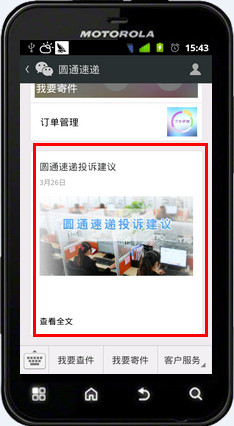
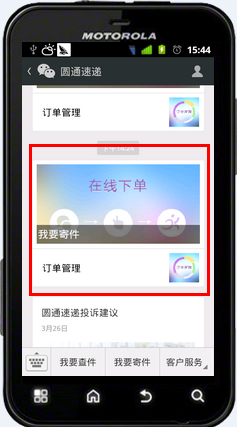
剛開始做的時候,我以為這兩種應該不是用的同一個接口,但是在文檔中找了半天也沒有找到除這個之外的,就試了下兩個圖文消息,發現就是這個接口發送的,如果多個的話,item中的Description會失效,只會顯示Title,大家試下就知道了,示例代碼:
01.1 //事件02. 2 public string EventHandle(XmlDocument xmldoc)03. 3 {04. 4 string responseContent = "";05. 5 XmlNode Event = xmldoc.SelectSingleNode("/xml/Event");06. 6 XmlNode EventKey = xmldoc.SelectSingleNode("/xml/EventKey");07. 7 XmlNode ToUserName = xmldoc.SelectSingleNode("/xml/ToUserName");08. 8 XmlNode FromUserName = xmldoc.SelectSingleNode("/xml/FromUserName");09. 9 if (Event!=null)10.10 {11.11 //菜單單擊事件12.12 if (Event.InnerText.Equals("CLICK"))13.13 {14.14 if (EventKey.InnerText.Equals("click_one"))//click_one15.15 {16.16 responseContent = string.Format(ReplyType.Message_Text,17.17 FromUserName.InnerText,18.18 ToUserName.InnerText, 19.19 DateTime.Now.Ticks, 20.20 "你點擊的是click_one");21.21 }22.22 else if (EventKey.InnerText.Equals("click_two"))//click_two23.23 {24.24 responseContent = string.Format(ReplyType.Message_News_Main, 25.25 FromUserName.InnerText, 26.26 ToUserName.InnerText, 27.27 DateTime.Now.Ticks, 28.28 "2",29.29 string.Format(ReplyType.Message_News_Item,"我要寄件","",30.30 "http://www.2cto.com/uploadfile/2016/0217/20160217092403484.jpg",31.31 "http://www.soso.com/")+32.32 string.Format(ReplyType.Message_News_Item, "訂單管理", "",33.33 "http://www.2cto.com/uploadfile/2016/0217/20160217092403632.jpg",34.34 "http://www.soso.com/"));35.35 }36.36 else if (EventKey.InnerText.Equals("click_three"))//click_three37.37 {38.38 responseContent = string.Format(ReplyType.Message_News_Main,39.39 FromUserName.InnerText,40.40 ToUserName.InnerText,41.41 DateTime.Now.Ticks,42.42 "1",43.43 string.Format(ReplyType.Message_News_Item, "標題", "摘要",44.44 "http://www.2cto.com/uploadfile/2016/0217/20160217092403571.jpg",45.45 "http://www.soso.com/"));46.46 }47.47 }48.48 }49.49 return responseContent;50.50 }51.51 /// 52.52 /// 圖文消息主體53.53 /// 54.54 public static string Message_News_Main55.55 {56.56 get57.57 {58.58 return @"59.59 0}]]>60.60 1}]]>61.61 { 2}62.62 63.63 {3}64.64 65.65 {4}66.66 67.67 ";68.68 }69.69 }70.70 /// 71.71 /// 圖文消息項72.72 /// 73.73 public static string Message_News_Item74.74 {75.75 get76.76 {77.77 return @"78.78 79.79 1}]]>80.80 2}]]>81.81 3}]]>82.82 ";83.83 }84.84 } 需要注意的是:XmlNode Event = xmldoc.SelectSingleNode("/xml/Event")表示獲取的是事件類型,XmlNode EventKey = xmldoc.SelectSingleNode("/xml/EventKey")表示事件標示,就是我們創建菜單添加click的key,通過key我們就可以判斷出是點的哪個菜單。
還有一點是回復超鏈接,有時候在服務號會發送一些鏈接,我們打開直接就會鏈接到相關網址,只需要在回復內容中添加:點擊進入,就可以了。
示例Demo下載 下載地址:http://pan.baidu.com/s/1i3kMpwh
後記 關於微信公眾平台當然還有許多其他的東西,本篇只是一些經驗之談,希望可以起到拋磚引玉的作用。有時候我們發現一些新鮮事物,覺得很難,就遠遠的看著,如果你用心的去感受它,其實也就這麼回事。
不要高估別人,低估自己,其實深入內心,很多你自以為很了不起的人,其實也沒什麼,真是這樣。
如果你覺得本篇文章對你有所幫助,請點擊右下部“推薦”,^_^