下面介紹如何在word裡面插入圖片,順便小弟發現MSDN官網有完整的OpenXML教程,雖然是全英文的不過還是很有幫助的。
Tips,原來摘抄代碼裡面沒有模板,在copy過來發現插入word中的圖片大小不一樣,我們如何查找設置圖片大小帶代碼的那一塊,建議自己用在word裡面插入一張圖片,通過OpenXml Tools 反編譯出C#代碼,然後改變圖片的大小,再次反編譯。
使用byeond compare 【http://www.scootersoftware.com/ 下載地址】比較C#代碼,就會發現是因為new DW.Extent() { Cx = 990000L, Cy = 792000L} 是因為這段設置照成的。 以後其實很多地方都可以借助OpenXml Tools反編譯來進行對比。查看設置樣式的屬性位置。
MSDN openxml學習鏈接: http://msdn.microsoft.com/en-us/library/office/bb491088(v=office.15).aspx
using System;
using System.Collections.Generic;
using System.Linq;
using System.Text;
using System.Threading.Tasks;
using DocumentFormat.OpenXml;
using DocumentFormat.OpenXml.Packaging;
using DocumentFormat.OpenXml.Wordprocessing;
using System.IO;
using DW = DocumentFormat.OpenXml.Drawing.Wordprocessing;
using PIC = DocumentFormat.OpenXml.Drawing.Pictures;
using A = DocumentFormat.OpenXml.Drawing;

namespace AddPictureIntoWord
{
    public class Program
    {
        public static void Main(string[] args)
        {
            string picPath = "u=639047729,3872612606&fm=11&gp=0.bmp";
            string filePath = "Test.docx";
            AddPictureIntoWord(filePath, picPath);
        }

        public static void AddPictureIntoWord(string filePath, string picturePath)
        {
            using (WordprocessingDocument doc = WordprocessingDocument.Open(filePath, true))
            {
                string picType = picturePath.Split('.').Last();
                ImagePartType imagePartType;
                ImagePart imagePart = null;
                // 通過後綴名判斷圖片類型, true 表示忽視大小寫
                if (Enum.TryParse<ImagePartType>(picType, true, out imagePartType))
                {
                    imagePart = doc.MainDocumentPart.AddImagePart(imagePartType);
                }

                imagePart.FeedData(File.Open(picturePath, FileMode.Open)); // 讀取圖片二進制流
                AddImageToBody(doc, doc.MainDocumentPart.GetIdOfPart(imagePart));
            }
        }

        // 摘抄自http://msdn.microsoft.com/EN-US/library/office/bb497430(v=office.15).aspx?cs-save-lang=1&cs-lang=csharp#code-snippet-5
      private static void AddImageToBody(WordprocessingDocument wordDoc, string relationshipId)
        {
            // Define the reference of the image.
            var element =
                 new Drawing(
                     new DW.Inline(
                         new DW.Extent() { Cx = 990000L, Cy = 792000L }, // 調節圖片大小
                         new DW.EffectExtent()
                         {
                             LeftEdge = 0L,
                             TopEdge = 0L,
                             RightEdge = 0L,
                             BottomEdge = 0L
                         },
                         new DW.DocProperties()
                         {
                             Id = (UInt32Value)1U,
                             Name = "Picture 1"
                         },
                         new DW.NonVisualGraphicFrameDrawingProperties(
                             new A.GraphicFrameLocks() { NoChangeAspect = true }),
                         new A.Graphic(
                             new A.GraphicData(
                                 new PIC.Picture(
                                     new PIC.NonVisualPictureProperties(
                                         new PIC.NonVisualDrawingProperties()
                                         {
                                             Id = (UInt32Value)0U,
                                             Name = "New Bitmap Image.jpg"
                                         },
                                         new PIC.NonVisualPictureDrawingProperties()),
                                     new PIC.BlipFill(
                                         new A.Blip(
                                             new A.BlipExtensionList(
                                                 new A.BlipExtension()
                                                 {
                                                     Uri =
                                                       "{28A0092B-C50C-407E-A947-70E740481C1C}"
                                                 })
                                         )
                                         {
                                             Embed = relationshipId,
                                             CompressionState =
                                             A.BlipCompressionValues.Print
                                         },
                                         new A.Stretch(
                                             new A.FillRectangle())),
                                     new PIC.ShapeProperties(
                                         new A.Transform2D(
                                             new A.Offset() { X = 0L, Y = 0L },
                                             new A.Extents() { Cx = 990000L, Cy = 792000L }), //與上面的對准
                                         new A.PresetGeometry(
                                             new A.AdjustValueList()
                                         ) { Preset = A.ShapeTypeValues.Rectangle }))
                             ) { Uri = "http://schemas.openxmlformats.org/drawingml/2006/picture" })
                     )
                     {
                         DistanceFromTop = (UInt32Value)0U,
                         DistanceFromBottom = (UInt32Value)0U,
                         DistanceFromLeft = (UInt32Value)0U,
                         DistanceFromRight = (UInt32Value)0U,
                         EditId = "50D07946"
                     });

            // Append the reference to body, the element should be in a Run.
            wordDoc.MainDocumentPart.Document.Body.AppendChild(new Paragraph(new Run(element)));
        }

    }
}
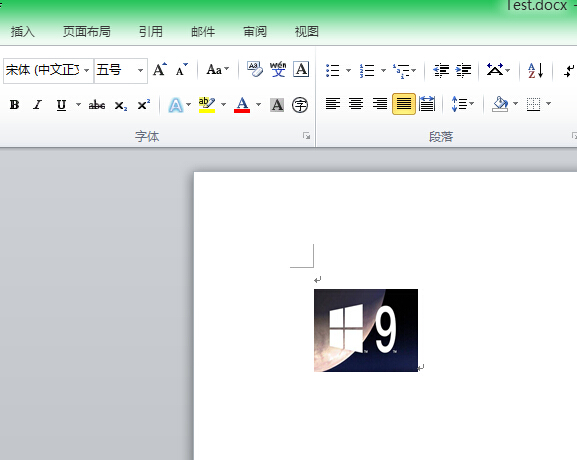
格式-段落-行距 改成單倍行距
嵌入式的圖片會被當做一個字符來處理,如果行距被設置成固定值,那麼這個圖片也只能顯示固定磅值的高度。
選中圖片,單擊右鍵選擇“設置對象格式”-“圖片”下面選擇“壓縮”-應用於:選中“文檔中的所有圖片”;更改分辨率:選中“打印”;選項:選中“壓縮圖片”和“刪除圖片的剪裁區域”-“確定”-“確定”
或在工具欄空白處單擊右鍵,在出現的下拉菜單中“圖片”前打上勾。然後選中圖片,點擊工具欄上“壓縮圖片”按鈕,在出現的對話框中應用於:選中“文檔中的所有圖片”;更改分辨率:選中“打印”;選項:選中“壓縮圖片”和“刪除圖片的剪裁區域”-“確定”