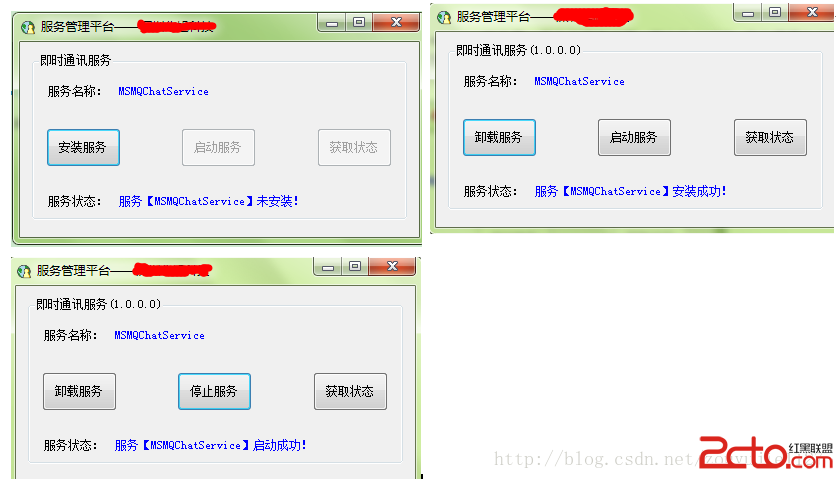
使用C#開發自定義windows服務是一件十分簡單的事。那麼什麼時候,我們需要自己開發windows服務呢,就是當我們需要計算機定期或者一直執行我們開發的某些程序的時候。這裡我以一個WCF的監聽服務為例,因為我是做一個局域聊天室,需要服務器端監聽終端,所以我就開發了一個服務,以便控制此監聽服務。然而,我們開發的windows服務,默認情況下是無法可視化的操作的,這裡我就額外的開發一個工具來對此服務進行操作,效果圖如下:
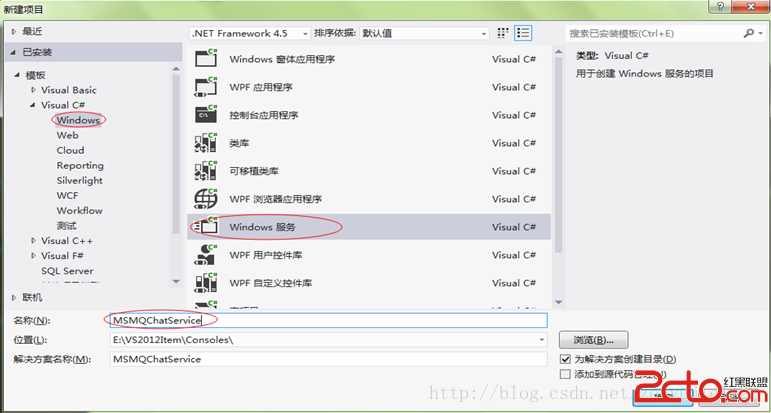
using System;
using System.Collections.Generic;
using System.Linq;
using System.Text;
using System.ServiceModel;
using System.ServiceModel.Description;
using System.ServiceProcess;

namespace MSMQChatService
{
    class Program
    {
        static void Main()
        {
            #region 服務啟動入口,正式用

            ServiceBase[] ServicesToRun;
            ServicesToRun = new ServiceBase[] {  new MQChatService()  };
            ServiceBase.Run(ServicesToRun);

            #endregion
        }
    }
MQChatService.cs代碼如下:
protected override void OnStart(string[] args)
        {
            //開啟服務  這裡就是你想要讓服務做的操作
            StartService();
        }
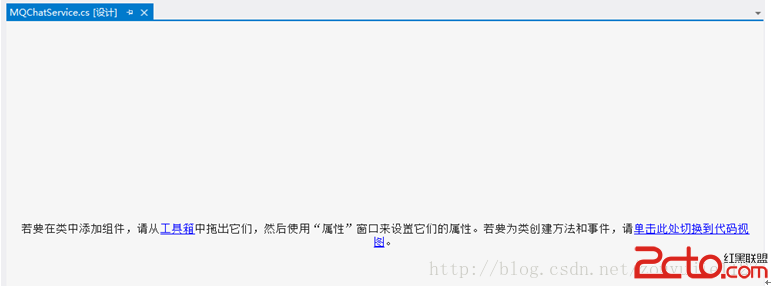
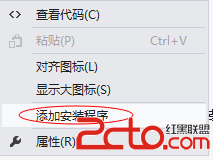
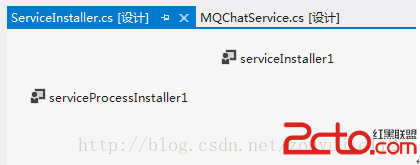
將會出現一個Installer為後綴的新界面,默認好像是Project Installer.cs,我這裡將其重命名為ServiceInstaller.cs
 vce0pqOpPC9wPgo8aW1nIHNyYz0="http://www.2cto.com/uploadfile/Collfiles/20140714/20140714083859282.png" alt="\">
好了,我們的windows服務已經開發好了,接下來就開發一個可視化的控制器,來控制服務的安裝、卸載、啟動和停止。
1、 新建一個windows程序,名稱ServiceSetup,Form1重命名為FrmServiceSetup,
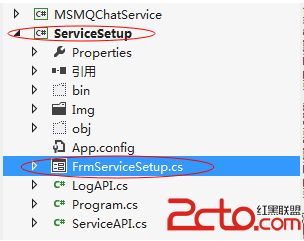
界面控件如下:
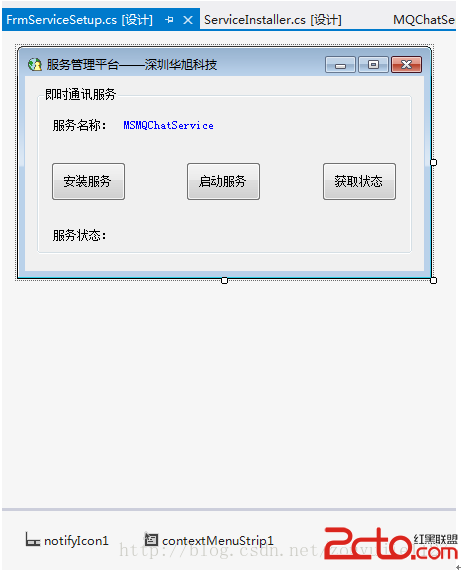
Program.cs代碼如下:
using System;
using System.Collections.Generic;
using System.Diagnostics;
using System.Linq;
using System.Threading;
using System.Threading.Tasks;
using System.Windows.Forms;

namespace ServiceSetup
{
    static class Program
    {
        ///
        /// 應用程序的主入口點。
        ///
        [STAThread]
        static void Main()
        {
            Process[] processes = System.Diagnostics.Process.GetProcessesByName(Application.CompanyName);
            if (processes.Length > 1)
            {
                MessageBox.Show("應用程序已經在運行中。");
                Thread.Sleep(1000);
                System.Environment.Exit(1);
            }
            else
            {
                Application.EnableVisualStyles();
                Application.SetCompatibleTextRenderingDefault(false);
                Application.Run(new FrmServiceSetup());
            }
        }
    }
}
主界面代碼:
using System;
using System.Collections.Generic;
using System.ComponentModel;
using System.Data;
using System.Drawing;
using System.Linq;
using System.Text;
using System.Threading.Tasks;
using System.Windows.Forms;

namespace ServiceSetup
{
    public partial class FrmServiceSetup : Form
    {
        string strServiceName = string.Empty;
        public FrmServiceSetup()
        {
            InitializeComponent();
            strServiceName = string.IsNullOrEmpty(lblServiceName.Text) ? "MSMQChatService" : lblServiceName.Text;
            InitControlStatus(strServiceName, btnInstallOrUninstall, btnStartOrEnd, btnGetStatus, lblMsg, gbMain);
        }

        ///
        /// 初始化控件狀態
        ///
        /// 服務名稱
        /// 安裝按鈕
        /// 啟動按鈕
        /// 獲取狀態按鈕
        /// 提示信息
        /// 服務所在組合框
        void InitControlStatus(string serviceName, Button btn1, Button btn2, Button btn3, Label txt, GroupBox gb)
        {
            try
            {
                btn1.Enabled = true;

                if (ServiceAPI.isServiceIsExisted(serviceName))
                {
                    btn3.Enabled = true;
                    btn2.Enabled = true;
                    btn1.Text = "卸載服務";
                    int status = ServiceAPI.GetServiceStatus(serviceName);
                    if (status == 4)
                    {
                        btn2.Text = "停止服務";
                    }
                    else
                    {
                        btn2.Text = "啟動服務";
                    }
                    GetServiceStatus(serviceName, txt);
                    //獲取服務版本
                    string temp = string.IsNullOrEmpty(ServiceAPI.GetServiceVersion(serviceName)) ? string.Empty : "(" + ServiceAPI.GetServiceVersion(serviceName) + ")";
                    gb.Text += temp;
                }
                else
                {
                    btn1.Text = "安裝服務";
                    btn2.Enabled = false;
                    btn3.Enabled = false;
                    txt.Text = "服務【" + serviceName + "】未安裝!";
                }
            }
            catch (Exception ex)
            {
                txt.Text = "error";
                LogAPI.WriteLog(ex.Message);
            }
        }

        ///
        /// 安裝或卸載服務
        ///
        /// 服務名稱
        /// 安裝、卸載
        /// 啟動、停止
        /// 提示信息
        /// 組合框
        void SetServerce(string serviceName, Button btnSet, Button btnOn, Button btnShow, Label txtMsg, GroupBox gb)
        {
            try
            {
                string location = System.Reflection.Assembly.GetExecutingAssembly().Location;
                string serviceFileName = location.Substring(0, location.LastIndexOf('\\')) + "\\" + serviceName + ".exe";

                if (btnSet.Text == "安裝服務")
                {
                    ServiceAPI.InstallmyService(null, serviceFileName);
                    if (ServiceAPI.isServiceIsExisted(serviceName))
                    {
                        txtMsg.Text = "服務【" + serviceName + "】安裝成功!";
                        btnOn.Enabled = btnShow.Enabled = true;
                        string temp = string.IsNullOrEmpty(ServiceAPI.GetServiceVersion(serviceName)) ? string.Empty : "(" + ServiceAPI.GetServiceVersion(serviceName) + ")";
                        gb.Text += temp;
                        btnSet.Text = "卸載服務";
                        btnOn.Text = "啟動服務";
                    }
                    else
                    {
                        txtMsg.Text = "服務【" + serviceName + "】安裝失敗,請檢查日志!";
                    }
                }
                else
                {
                    ServiceAPI.UnInstallmyService(serviceFileName);
                    if (!ServiceAPI.isServiceIsExisted(serviceName))
                    {
                        txtMsg.Text = "服務【" + serviceName + "】卸載成功!";
                        btnOn.Enabled = btnShow.Enabled = false;
                        btnSet.Text = "安裝服務";
                        //gb.Text =strServiceName;
                    }
                    else
                    {
                        txtMsg.Text = "服務【" + serviceName + "】卸載失敗,請檢查日志!";
                    }
                }
            }
            catch (Exception ex)
            {
                txtMsg.Text = "error";
                LogAPI.WriteLog(ex.Message);
            }
        }

        //獲取服務狀態
        void GetServiceStatus(string serviceName, Label txtStatus)
        {
            try
            {
                if (ServiceAPI.isServiceIsExisted(serviceName))
                {
                    string statusStr = "";
                    int status = ServiceAPI.GetServiceStatus(serviceName);
                    switch (status)
                    {
                        case 1:
                            statusStr = "服務未運行!";
                            break;
                        case 2:
                            statusStr = "服務正在啟動!";
                            break;
                        case 3:
                            statusStr = "服務正在停止!";
                            break;
                        case 4:
                            statusStr = "服務正在運行!";
                            break;
                        case 5:
                            statusStr = "服務即將繼續!";
                            break;
                        case 6:
                            statusStr = "服務即將暫停!";
                            break;
                        case 7:
                            statusStr = "服務已暫停!";
                            break;
                        default:
                            statusStr = "未知狀態!";
                            break;
                    }
                    txtStatus.Text = statusStr;
                }
                else
                {
                    txtStatus.Text = "服務【" + serviceName + "】未安裝!";
                }
            }
            catch (Exception ex)
            {
                txtStatus.Text = "error";
                LogAPI.WriteLog(ex.Message);
            }
        }

        //啟動服務
        void OnService(string serviceName, Button btn, Label txt)
        {
            try
            {
                if (btn.Text == "啟動服務")
                {
                    ServiceAPI.RunService(serviceName);

                    int status = ServiceAPI.GetServiceStatus(serviceName);
                    if (status == 2 || status == 4 || status == 5)
                    {
                        txt.Text = "服務【" + serviceName + "】啟動成功!";
                        btn.Text = "停止服務";
                    }
                    else
                    {
                        txt.Text = "服務【" + serviceName + "】啟動失敗!";
                    }
                }
                else
                {
                    ServiceAPI.StopService(serviceName);

                    int status = ServiceAPI.GetServiceStatus(serviceName);
                    if (status == 1 || status == 3 || status == 6 || status == 7)
                    {
                        txt.Text = "服務【" + serviceName + "】停止成功!";
                        btn.Text = "啟動服務";
                    }
                    else
                    {
                        txt.Text = "服務【" + serviceName + "】停止失敗!";
                    }
                }
            }
            catch (Exception ex)
            {
                txt.Text = "error";
                LogAPI.WriteLog(ex.Message);
            }
        }

        //安裝or卸載服務
        private void btnInstallOrUninstall_Click(object sender, EventArgs e)
        {
            btnInstallOrUninstall.Enabled = false;
            SetServerce(strServiceName, btnInstallOrUninstall, btnStartOrEnd, btnGetStatus, lblMsg, gbMain);
            btnInstallOrUninstall.Enabled = true;
            btnInstallOrUninstall.Focus();
        }

        //啟動or停止服務
        private void btnStartOrEnd_Click(object sender, EventArgs e)
        {
            btnStartOrEnd.Enabled = false;
            OnService(strServiceName, btnStartOrEnd, lblMsg);
            btnStartOrEnd.Enabled = true;
            btnStartOrEnd.Focus();
        }

        //獲取服務狀態
        private void btnGetStatus_Click(object sender, EventArgs e)
        {
            btnGetStatus.Enabled = false;
            GetServiceStatus(strServiceName, lblMsg);
            btnGetStatus.Enabled = true;
            btnGetStatus.Focus();
        }

        private void FrmServiceSetup_Resize(object sender, EventArgs e)
        {
            if (this.WindowState == FormWindowState.Minimized)    //最小化到系統托盤
            {
                notifyIcon1.Visible = true;    //顯示托盤圖標
                this.ShowInTaskbar = false;
                this.Hide();    //隱藏窗口
            }
        }

        private void FrmServiceSetup_FormClosing(object sender, FormClosingEventArgs e)
        {
            DialogResult result = MessageBox.Show("是縮小到托盤?", "確認", MessageBoxButtons.YesNoCancel, MessageBoxIcon.Information);
            if (result== DialogResult.Yes)
            {
                // 取消關閉窗體
                e.Cancel = true;
                // 將窗體變為最小化
                this.WindowState = FormWindowState.Minimized;
            }
            else if (result == DialogResult.No)
            {
                System.Environment.Exit(0);
            }
            else
            {
                e.Cancel = true;
            }
        }

        private void notifyIcon1_MouseClick(object sender, MouseEventArgs e)
        {
            if (e.Button == MouseButtons.Left&&this.WindowState == FormWindowState.Minimized)
            {
                    this.Show();
                    this.WindowState = FormWindowState.Normal;
                    this.ShowInTaskbar = true; //顯示在系統任務欄
                    //notifyIcon1.Visible = false; //托盤圖標不可見
                    this.Activate();
            }
        }

        private void 打開主界面ToolStripMenuItem_Click(object sender, EventArgs e)
        {
            this.Show();
            this.WindowState = FormWindowState.Normal;
            this.ShowInTaskbar = true; //顯示在系統任務欄
            notifyIcon1.Visible = false; //托盤圖標不可見
            this.Activate();
        }

        private void 退出ToolStripMenuItem_Click(object sender, EventArgs e)
        {
            System.Environment.Exit(0);
        }
    }
}
新建一個類,專門用於日志操作LogAPI.cs
using System;
using System.Collections.Generic;
using System.IO;
using System.Linq;
using System.Text;
using System.Threading.Tasks;

namespace ServiceSetup
{
    public class LogAPI
    {
        private static string myPath = "";
        private static string myName = "";

        ///
        /// 初始化日志文件
        ///
        ///
        ///
        public static void InitLogAPI(string logPath, string logName)
        {
            myPath = logPath;
            myName = logName;
        }

        ///
        /// 寫入日志
        ///
        /// 日志信息
        public static void WriteLog(string ex)
        {
            if (myPath == "" || myName == "")
                return;

            string Year = DateTime.Now.Year.ToString();
            string Month = DateTime.Now.Month.ToString().PadLeft(2, '0');
            string Day = DateTime.Now.Day.ToString().PadLeft(2, '0');

            //年月日文件夾是否存在,不存在則建立
            if (!Directory.Exists(myPath + "\\LogFiles\\" + Year + "_" + Month + "\\" + Year + "_" + Month + "_" + Day))
            {
                Directory.CreateDirectory(myPath + "\\LogFiles\\" + Year + "_" + Month + "\\" + Year + "_" + Month + "_" + Day);
            }

            //寫入日志UNDO,Exception has not been handle
            string LogFile = myPath + "\\LogFiles\\" + Year + "_" + Month + "\\" + Year + "_" + Month + "_" + Day + "\\" + myName;
            if (!File.Exists(LogFile))
            {
                System.IO.StreamWriter myFile;
                myFile = System.IO.File.AppendText(LogFile);
                myFile.Close();
            }

            while (true)
            {
                try
                {
                    StreamWriter sr = File.AppendText(LogFile);
                    sr.WriteLine(DateTime.Now.ToString("HH:mm:ss") + "  " + ex);
                    sr.Close();
                    break;
                }
                catch (Exception e)
                {
                    System.Threading.Thread.Sleep(50);
                    continue;
                }
            }

        }

    }
}