一、前言
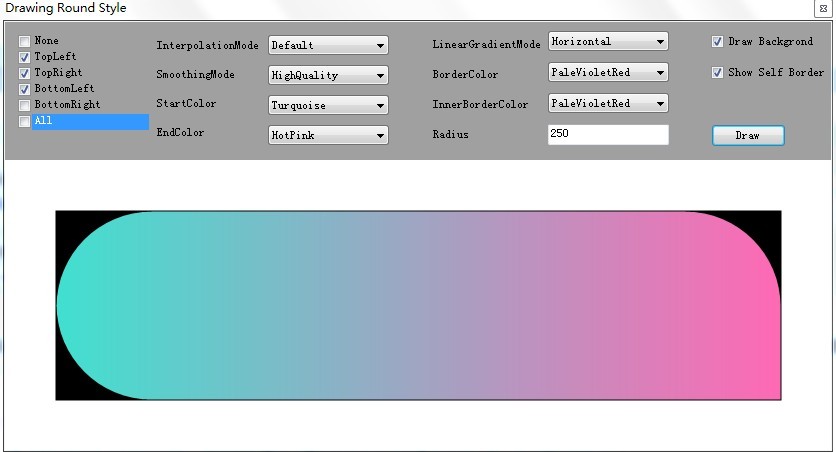
本文主要介紹C# GDI+如何繪制矩行的圓角,其中涉及到如何使用位操作來處理組合的技巧。GDI+的本質在於,它能夠替代開發人員實現與顯示器及其它外部設備的交互。對於控件美化而言,需要達到自己期望的效果,GDI+必不可少。繪制後的圓角效果圖如下:
二、圓角枚舉與相應組合處理設計
對於矩行而言,圓角分為左上角、右上角、左下角和右下角。組合情況就分為無圓角、一個圓角、二個圓角、三個圓角以及四個圓角。枚舉需要滿足該組合情況,沒必要在枚舉中將 全部組合列出,只需要通過位操作就能計算出屬於哪種組合。枚舉類設計如下:
[Flags]
    public enum RoundStyle
    {
        None = 0,
        TopLeft = 1,
        TopRight = 2,
        BottomLeft = 4,
        BottomRight = 8 ,
        All = TopLeft | TopRight | BottomLeft | BottomRight
    }
矩行的圓角所有組合情況如下:
RoundStyle.None
RoundStyle.All
RoundStyle.BottomLeft
RoundStyle.BottomRight
RoundStyle.TopLeft
RoundStyle.TopRightRoundStyle.BottomRight | RoundStyle.BottomLeft
RoundStyle.BottomRight | RoundStyle.TopRight
RoundStyle.TopRight | RoundStyle.TopLeft
RoundStyle.BottomLeft | RoundStyle.TopLeft
RoundStyle.BottomRight | RoundStyle.TopLeft
RoundStyle.TopRight | RoundStyle.BottomLeftRoundStyle.BottomLeft | RoundStyle.BottomRight | RoundStyle.TopLeft
RoundStyle.BottomLeft | RoundStyle.BottomRight | RoundStyle.TopRight
RoundStyle.BottomLeft | RoundStyle.TopLeft | RoundStyle.TopRight
RoundStyle.BottomRight | RoundStyle.TopRight | RoundStyle.TopLeft
對於每一種組合,必須提供相應的操作來執行路徑計算,這主要是因為GraphicsPath的路徑是有順序的。因此所有組合對應的處理方式如下:
private static IDictionary<RoundStyle, Action<GraphicsPath, Rectangle, int, int>>
            CreateRoundStylesEventContainer()
        {
            var container = new Dictionary<RoundStyle, Action<GraphicsPath, Rectangle, int, int>>();

            container.Add(RoundStyle.None, (path, rect, radius, radiusAdjustment) => { path.AddRectangle(rect); });
            container.Add(RoundStyle.All, AddAllRoundStyle);

            container.Add(RoundStyle.BottomLeft, AddBottomLeftRoundStyle);
            container.Add(RoundStyle.BottomRight, AddBottomRightRoundStyle);
            container.Add(RoundStyle.TopLeft, AddTopLeftRoundStyle);
            container.Add(RoundStyle.TopRight, AddTopRightRoundStyle);

            container.Add(RoundStyle.BottomRight | RoundStyle.BottomLeft, AddBottomRightAndBottomLeftRoundStyle);
            container.Add(RoundStyle.BottomRight | RoundStyle.TopRight, AddBottomRightAndTopRightRoundStyle);
            container.Add(RoundStyle.TopRight | RoundStyle.TopLeft, AddTopRightAndTopLeftRoundStyle);
            container.Add(RoundStyle.BottomLeft | RoundStyle.TopLeft, AddBottomLeftAndTopLeftRoundStyle);
            container.Add(RoundStyle.BottomRight | RoundStyle.TopLeft, AddBottomRightAndTopLeftRoundStyle);
            container.Add(RoundStyle.TopRight | RoundStyle.BottomLeft, AddTopRightAndBottomLeftRoundStyle);

            container.Add(RoundStyle.BottomLeft | RoundStyle.BottomRight | RoundStyle.TopLeft, AddBottomAndTopLeftRoundStyle);
            container.Add(RoundStyle.BottomLeft | RoundStyle.BottomRight | RoundStyle.TopRight, AddBottomAndTopRightRoundStyle);
            container.Add(RoundStyle.BottomLeft | RoundStyle.TopLeft | RoundStyle.TopRight, AddTopAndBottomLeftRoundStyle);
            container.Add(RoundStyle.BottomRight | RoundStyle.TopRight | RoundStyle.TopLeft, AddTopAndBottomRightRoundStyle);

            return container;
        }
三、GraphicsPath.AddArc方法
GraphicsPath.AddArc 方法如下:
public void AddArc(Rectangle rect, float startAngle, float sweepAngle);
public void AddArc(RectangleF rect, float startAngle, float sweepAngle);
public void AddArc(float x, float y, float width, float height, float startAngle, float sweepAngle);
public void AddArc(int x, int y, int width, int height, float startAngle, float sweepAngle);
此方法主要是繪制圓角的,繪制的方式與二位坐標的角度是不一樣,官方參數資料如下:
x 矩形區域左上角的 X 軸坐標,這個矩形區域定義用來繪制弧形的橢圓形。
y 矩形區域左上角的 Y 軸座標,這個矩形區域定義用來繪制弧形的橢圓形。
width 矩形區域的寬度,這個矩形區域定義用來繪制弧形的橢圓形。
height 矩形區域的高度,這個矩形區域定義用來繪制弧形的橢圓形。
startAngle 弧形的開始點角度,順時針自 X 軸所測得的度數。
sweepAngle 介於弧形的 startAngle 和結束點的角度。
如果圓形中具有先前的直線或曲線,會加入線段來將先前線段的結束點連接到弧形的開端。
弧形是沿著指定矩形范圍內的橢圓形周圍所描繪的。弧形的開始點是由橢圓形的 X 軸 (0 度角) 順時針測量開始點角度的度數所決定。結束點位置的決定很類似,從開始點順時針測量跨越角度的度數所決定。如果跨越的角度大於 360 度或小於 -360 度,則弧形分別跨越了 360 度或 -360 度。
弧形的開始點是由橢圓形的 X 軸 (0 度角) 順時針測量開始點角度的度數所決定,GraphicsPath增加對象的順序也是需要注意的(有部分連接線是系統繪制的)。此處與數學中二位坐標定義的角度是反方向的,需要特別注意。
四、繪制圓角組合
3.1 繪制一個圓角
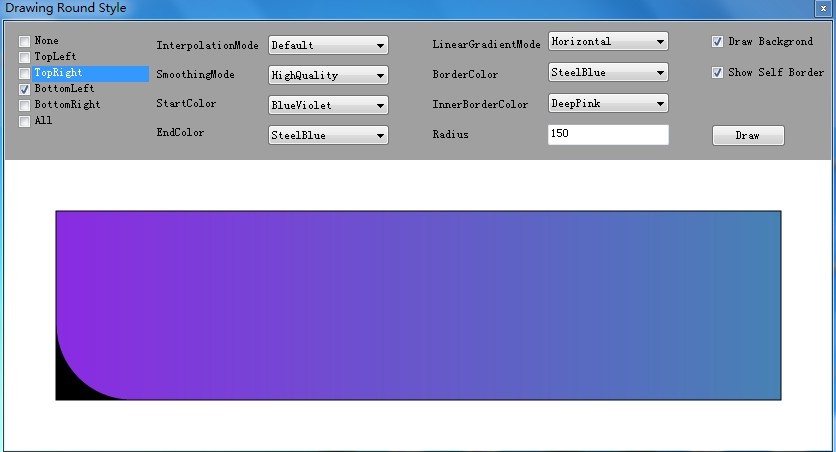
矩行的一個圓角所有組合情況如下:RoundStyle.BottomLeft、RoundStyle.BottomRight、RoundStyle.TopLeft、RoundStyle.TopRight。繪制方法如下:
繪制一個圓角

        private static void AddBottomLeftRoundStyle(GraphicsPath path,
            Rectangle rect, int radius, int radiusAdjustment)
        {
            AddBottomLeftArc(rect, radius, path, radiusAdjustment);
            AddTopLine(rect, path, radiusAdjustment);
            AddRightLine(rect, path, radiusAdjustment);
        }

        private static void AddBottomRightRoundStyle(GraphicsPath path,
            Rectangle rect, int radius, int radiusAdjustment)
        {
            AddBottomRightArc(rect, radius, path, radiusAdjustment);
            AddLeftLine(rect, path, radiusAdjustment);
            AddTopLine(rect, path, radiusAdjustment);
        }

        private static void AddTopRightRoundStyle(GraphicsPath path,
            Rectangle rect, int radius, int radiusAdjustment)
        {
            AddTopRightArc(rect, radius, path, radiusAdjustment);
            AddBottomLine(rect, path, radiusAdjustment);
            AddLeftLine(rect, path, radiusAdjustment);
        }

        private static void AddTopLeftRoundStyle(GraphicsPath path,
            Rectangle rect, int radius, int radiusAdjustment)
        {
            AddTopLeftArc(rect, radius, path, radiusAdjustment);
            AddRightLine(rect, path, radiusAdjustment);
            AddBottomLine(rect, path, radiusAdjustment);
        }
效果圖如下:
3.2 繪制二個圓角
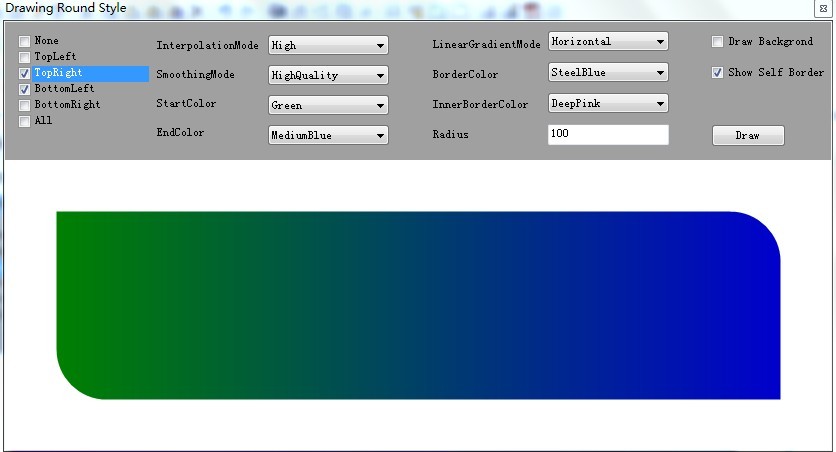
矩行的一個圓角所有組合情況如下:
RoundStyle.BottomRight | RoundStyle.BottomLeft
RoundStyle.BottomRight | RoundStyle.TopRight
RoundStyle.TopRight | RoundStyle.TopLeft
RoundStyle.BottomLeft | RoundStyle.TopLeft
RoundStyle.BottomRight | RoundStyle.TopLeft
RoundStyle.TopRight | RoundStyle.BottomLeft。
繪制方法如下:
繪制二個圓角

        private static void AddTopRightAndBottomLeftRoundStyle(GraphicsPath path,
            Rectangle rect, int radius, int radiusAdjustment)
        {
            AddTopRightArc(rect, radius, path, radiusAdjustment);
            AddBottomLineWithLeftOffset(path, rect, radius, radiusAdjustment, false);
            AddBottomLeftArc(rect, radius, path, radiusAdjustment);
            AddTopLineWithRightOffset(path, rect, radius, radiusAdjustment);
        }

        private static void AddBottomRightAndTopLeftRoundStyle(GraphicsPath path,
            Rectangle rect, int radius, int radiusAdjustment)
        {
            AddBottomRightArc(rect, radius, path, radiusAdjustment);
            AddBottomLineWithRightOffset(path, rect, radius, radiusAdjustment);
            AddTopLeftArc(rect, radius, path, radiusAdjustment);
            AddTopLineWithLeftOffset(path, rect, radius, radiusAdjustment);
        }

        private static void AddBottomLeftAndTopLeftRoundStyle(GraphicsPath path,
            Rectangle rect, int radius, int radiusAdjustment)
        {
            AddBottomLeftArc(rect, radius, path, radiusAdjustment);
            AddTopLeftArc(rect, radius, path, radiusAdjustment);
            AddRightLine(rect, path, radiusAdjustment);
        }

        private static void AddTopRightAndTopLeftRoundStyle(GraphicsPath path,
            Rectangle rect, int radius, int radiusAdjustment)
        {
            AddTopLeftArc(rect, radius, path, radiusAdjustment);
            AddTopRightArc(rect, radius, path, radiusAdjustment);
            AddBottomLine(rect, path, radiusAdjustment);
        }

        private static void AddBottomRightAndTopRightRoundStyle(GraphicsPath path,
            Rectangle rect, int radius, int radiusAdjustment)
        {
            AddTopRightArc(rect, radius, path, radiusAdjustment);
            AddBottomRightArc(rect, radius, path, radiusAdjustment);
            AddLeftLine(rect, path, radiusAdjustment);
        }

        private static void AddBottomRightAndBottomLeftRoundStyle(GraphicsPath path,
            Rectangle rect, int radius, int radiusAdjustment)
        {
            AddBottomRightArc(rect, radius, path, radiusAdjustment);
            AddBottomLeftArc(rect, radius, path, radiusAdjustment);
            AddTopLine(rect, path, radiusAdjustment);
        }
效果圖如下:
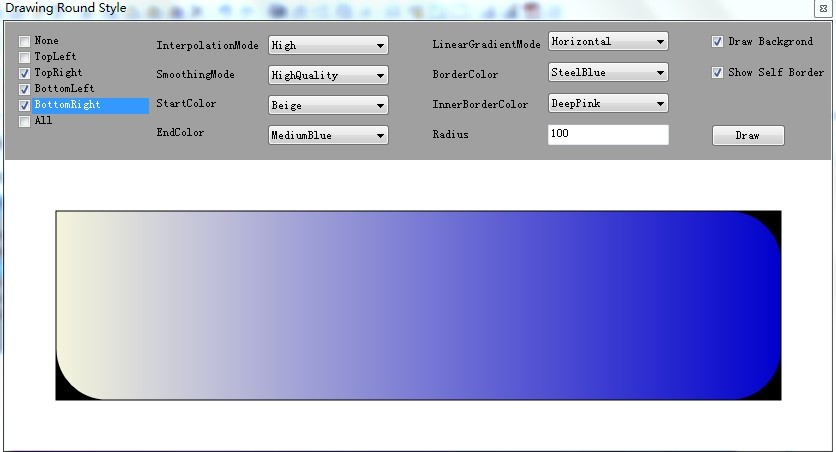
3.2 繪制三個圓角
矩行的一個圓角所有組合情況如下:
RoundStyle.BottomLeft | RoundStyle.BottomRight | RoundStyle.TopLeft
RoundStyle.BottomLeft | RoundStyle.BottomRight | RoundStyle.TopRight
RoundStyle.BottomLeft | RoundStyle.TopLeft | RoundStyle.TopRight
RoundStyle.BottomRight | RoundStyle.TopRight | RoundStyle.TopLeft。
繪制方法如下:
繪制三個圓角

        private static void AddTopAndBottomRightRoundStyle(GraphicsPath path,
            Rectangle rect, int radius, int radiusAdjustment)
        {
            AddTopLeftArc(rect, radius, path, radiusAdjustment);
            AddTopRightArc(rect, radius, path, radiusAdjustment);
            AddBottomRightArc(rect, radius, path, radiusAdjustment);
            AddBottomLineWithRightOffset(path, rect, radius, radiusAdjustment);
        }

        private static void AddTopAndBottomLeftRoundStyle(GraphicsPath path,
            Rectangle rect, int radius, int radiusAdjustment)
        {
            AddTopLeftArc(rect, radius, path, radiusAdjustment);
            AddTopRightArc(rect, radius, path, radiusAdjustment);
            AddBottomLineWithLeftOffset(path, rect, radius, radiusAdjustment, false);
            AddBottomLeftArc(rect, radius, path, radiusAdjustment);
        }

        private static void AddBottomAndTopRightRoundStyle(GraphicsPath path,
            Rectangle rect, int radius, int radiusAdjustment)
        {
            AddBottomRightArc(rect, radius, path, radiusAdjustment);
            AddBottomLeftArc(rect, radius, path, radiusAdjustment);
            AddTopLineWithRightOffset(path, rect, radius, radiusAdjustment);
            AddTopRightArc(rect, radius, path, radiusAdjustment);
        }

        private static void AddBottomAndTopLeftRoundStyle(GraphicsPath path,
            Rectangle rect, int radius, int radiusAdjustment)
        {
            AddBottomRightArc(rect, radius, path, radiusAdjustment);
            AddBottomLeftArc(rect, radius, path, radiusAdjustment);
            AddTopLeftArc(rect, radius, path, radiusAdjustment);
            AddTopLineWithLeftOffset(path, rect, radius, radiusAdjustment);
        }
效果圖如下:
3.4 繪制四個圓角
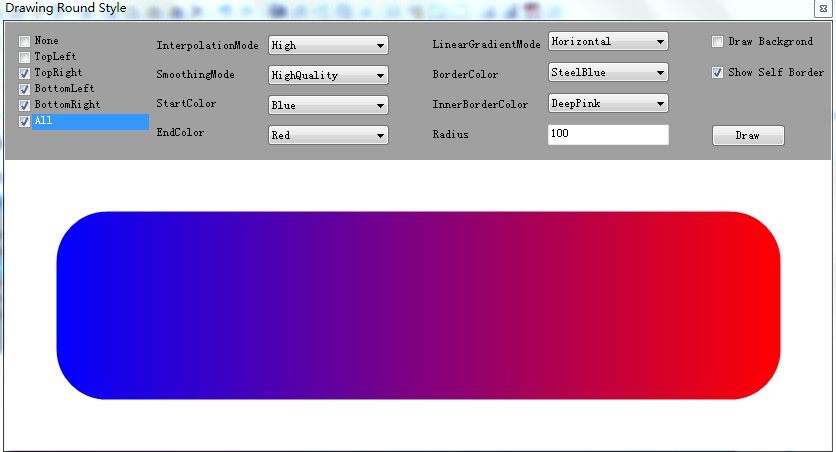
矩行的四個圓角所有組合情況如下:RoundStyle.All或者RoundStyle.BottomLeft | RoundStyle.BottomRight | RoundStyle.TopLeft | RoundStyle.TopRight。
繪制方法如下:
繪制四個圓角

        private static void AddAllRoundStyle(GraphicsPath path,
            Rectangle rect, int radius, int radiusAdjustment)
        {
            AddTopLeftArc(rect, radius, path, radiusAdjustment);
            AddTopRightArc(rect, radius, path, radiusAdjustment);
            AddBottomRightArc(rect, radius, path, radiusAdjustment);
            AddBottomLeftArc(rect, radius, path, radiusAdjustment);

        }
效果圖如下:
四、總結
繪制圓角在美化控件方面的場景還是比較多的,本文采用枚舉的位操作來對所有情況進行操作。有一段時間沒寫隨筆了,可以寫的東西很多,由於個人的時間問題卻一直拖到現在。上面的圓角繪制例子是昨天作為練習寫的,只是簡單的手動測試了一下,如有BUG請及時通知本人,不勝感激。目前開發的產品很多控件都需要自繪,統計學需要寫的算法也比較多。雖然項目成員總人數為100,但開發所占的比例才40%不到,任重而道遠。
源碼下載: 矩陣圓角繪制源碼
http://files.cnblogs.com/jasenkin/Winform/Jasen.Framework.rar
作者:JasenKin
出處:http://www.cnblogs.com/jasenkin/