看到這個標題,有人會問,現在都用xml做配置文件了,誰還用INI文件啊!下面來簡單對比一下xml和ini:
1、XML功能強大表達能力強,同時擴展性好。
2、它的主要優勢是異構平台的整合、通訊。
3、缺點主要是使用復雜,運行庫占用的資源較多。
4、如果多個程序進行數據交換或是跨平台通訊則使用功能強大的XML;
5、INI雖表達能力不強,但是簡單實用,接口方便。如果是用於應用程序的配置INI文件就夠了。
至於哪個更好,應該用哪個,可以根據自己愛好和需求。個人感覺INI文件操作簡單,就是讀取文件,處理字符串,保存到文件,可謂是簡單粗暴。而且內容也比較友好,沒有冗余的東西。
由於最近項目中用到INI文件,所以抽空編寫了一個Helper,取名交INIHelper。這裡先不給出它的源碼,先來看下他的用法。
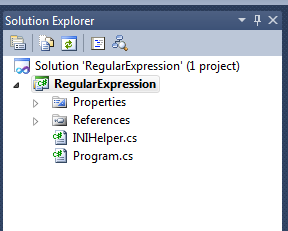
一、INIHelper的用法這裡為了做演示,我建了一個C# 控制台應用程序,隨便起了個名字,加入了INIHelper這個類。項目結構如圖:
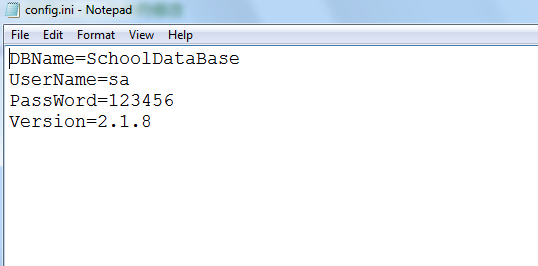
在Debug目錄下面添加了一個config.ini的文件,內容如下:
下面我們用這個Helper來讀取這個INI文件的所有內容,代碼如下:
class Program
   {
      static void Main(string[] args)
      {
         try
         {
            INIHelper helper = new INIHelper("config.ini");
            Console.WriteLine(helper.GetValueByName("DBName"));
            Console.WriteLine(helper.GetValueByName("UserName"));
            Console.WriteLine(helper.GetValueByName("PassWord"));
            Console.WriteLine(helper.GetValueByName("Version"));
         }
         catch (Exception ex)
         {
            Console.WriteLine(ex.Message);
         }

         Console.Read();
      }
   }
輸出結果如下:
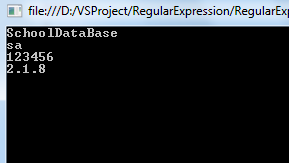
是不是很方便,這裡還有另外一種寫法,代碼如下:
class Program
   {
      static void Main(string[] args)
      {
         try
         {
            INIHelper helper = new INIHelper();
            helper.LoadINI("config.ini");
            Console.WriteLine(helper.GetValueByName("DBName"));
            Console.WriteLine(helper.GetValueByName("UserName"));
            Console.WriteLine(helper.GetValueByName("PassWord"));
            Console.WriteLine(helper.GetValueByName("Version"));
         }
         catch (Exception ex)
         {
            Console.WriteLine(ex.Message);
         }

         Console.Read();
      }
   }
代碼中加粗的部分就是另外一種寫法,一種方法是在構造時加載ini文件,另外一種方法時在需要的時候加載。到這裡讀取ini文件的就說完了,下面來說一下修改ini文件。這裡我們來修改ini文件密碼為root,然後保存到ini文件中,來看看代碼怎麼寫:
class Program
   {
      static void Main(string[] args)
      {
         try
         {
            INIHelper helper = new INIHelper();
            helper.LoadINI("config.ini");
            helper.SetValueByName("PassWord", "root");
            helper.SaveINI();
         }
         catch (Exception ex)
         {
            Console.WriteLine(ex.Message);
         }

         Console.Read();
      }
   }
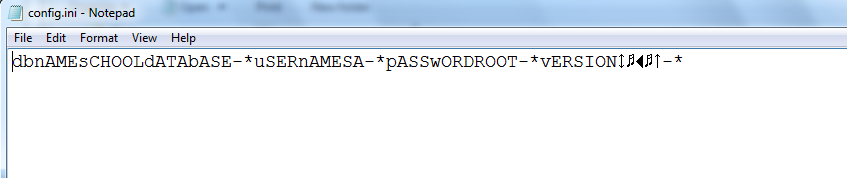
首先加載ini文件,然後調用SetValueByName方法修改密碼,最後調用SaveINI方法保存。保存後,可以打開ini文件看到內容變了,這裡就不再截圖了。其還支持加密解密,這樣我們的配置文件內容就不會被被人看到和隨意修改了,加密後的效果如下:
二、揭開INIHelper神秘的面紗
下面來看看INIHelper的具體實現,首先來看構造方法和LoadINI,其實現代碼如下:
      private string newLine = "\r\n";  //換行符
      private string filePath = string.Empty; //文件名稱
      private string fileContent = string.Empty; //文件內容

      public INIHelper() { }
      /// <summary>
      /// 有參構造方法,直接讀取INI文件
      /// </summary>
      /// <param name="filePath"></param>
      public INIHelper(string filePath)
      {
         this.LoadINI(filePath);
      }

      /// <summary>
      /// 加載並讀取INI文件
      /// </summary>
      /// <param name="fileName">文件路徑</param>
      public void LoadINI(string filePath)
      {
         if (filePath.Trim().Length > 0)
         {
            this.filePath = filePath;
            ReadINIFile();
         }
         else
         {
            throw new Exception("Invalid file name!");
         }
      }
可以看到在有參構造方法裡面調用了LoadINI方法,所以等價於調用無參構造函數然後調用LoadINI方法。LoadINI方法裡面首先判斷文件路徑是否合法,合法的話就讀取ini文件,否則拋出異常。ReadINIFile方法就是讀取文件內容,然後賦給fileContent,其實現如下:
/// <summary>
      /// 讀取INI文件
      /// </summary>
      private void ReadINIFile()
      {
         if (File.Exists(this.filePath))
         {
            try
            {
               using (StreamReader sr = new StreamReader(this.filePath))
               {
                  this.fileContent = sr.ReadToEnd();
                  this.fileContent = EncryptionAndDecryption(fileContent); //解密
                  //如果文件內容為空或者沒有換行符,則認為是無效的INI文件。
                  if (fileContent.Trim().Length <= 0 || !fileContent.Contains("\n"))
                  {
                     throw new Exception("Invalid ini file");
                  }
                  else
                  {
                     //保存文件默認換行符
                     if (!fileContent.Contains(newLine))
                     {
                        this.newLine = "\n";
                     }
                  }
               }
            }
            catch (Exception ex)
            {
               throw new Exception("Read file error! Error Message:" + ex.Message);
            }
         }
         else
         {
            throw new Exception("File " + filePath + " not found!");
         }
      }
這個已經包含了加密解密的方法,首先讀取文件內容,解密,然後判斷文件是否合法,及是否有為空和是否有換行符,然後判斷裡面的換行符是否為默認值,否則修改newLine為文件默認的換行符。(大家可以修改代碼,自定分割符。默認是支持\r\n或\n)
/// <summary>
      /// 讀取INI文件某個配置項的值
      /// </summary>
      /// <param name="fieldName"></param>
      /// <returns></returns>
      public string GetValueByName(string fieldName)
      {
         fileContent = fileContent.Replace(newLine, ";");
         fileContent = fileContent.Replace(" ", "");
         fileContent = fileContent.EndsWith(";") ? fileContent : fileContent + ";";
         Regex reg = new Regex("(?<=" + fieldName + "=).*?(?=;)");
         Match m = reg.Match(fileContent);
         return m.Value;
      }

      /// <summary>
      /// 修改INI文件某個配置項的值
      /// </summary>
      /// <param name="fieldName"></param>
      /// <param name="value"></param>
      public void SetValueByName(string fieldName, string value)
      {
         string reg = "(?<=" + fieldName + "=).*?(?=;)";
         fileContent = Regex.Replace(fileContent, reg, value);
      }
這個是讀取和修改某個配置項的方法,使用正則表達式進行匹配。修改只是修改fileContent的值,並不執行保存。
/// <summary>
      /// 保存對INI文件的修改
      /// </summary>
      public void SaveINI()
      {
         try
         {
            fileContent = fileContent.Replace(";", newLine); //替換換行符
            fileContent = EncryptionAndDecryption(fileContent); //加密
            using (StreamWriter sw = new StreamWriter(filePath))
            {
               sw.Write(fileContent);
               sw.Close();
            }
         }
         catch (Exception ex)
         {
            throw new Exception("Save file error! Error Message:" + ex.Message);
         }
      }

      /// <summary>
      /// 加密解密算法,使用異或算法
      /// </summary>
      /// <param name="str"></param>
      public string EncryptionAndDecryption(string str)
      {
         byte key = 32;
         byte[] buffer = Encoding.Default.GetBytes(str);
         for (int i = 0; i < buffer.Length; i++)
         {
            buffer[i] ^= key;
         }
         return Encoding.Default.GetString(buffer);
      }
SaveINI執行加密後保存到ini文件,這裡給出了簡單的對稱加密算法,大家使用時可以使用自定義的加密算法。
注意:笫一次讀取配置文件由於沒有加密,調用了解密算法,所以會出現文件無效的異常。這裡需要先加密保存一次,然後就好了。
源碼下載