雖然CodePlex上的WPF擴展的XXX ToolKit源碼中有一個CheckListBox控件,但是,就看它那源代碼,也過於復雜了。並 且,我也希望自己來編寫一個CheckListBox控件。
所謂CheckListBox控件嘛,就是既可以Select又可以Check的 ListBox控件。有人會說,不用寫控件,自定義一個ListBoxItem的模板就行了,也確實可以這樣做,不過,還是有些問題的 ,如果只是重定義ListBoxItem的模板,那僅僅是為其UI上加了個可以顯示一個“勾”的東東而已,而對於邏輯是沒有任何 變化。
既然要可以Select又能Check,那顯然只是重定義模板是不行的。ListBoxItem類本身有一個IsSelected屬性 ,指示列表項是否被選中,而且,人家在ListBox中也有一個SelectedItems屬性,可以獲得ListBox控件的當前選中的所有 項。
很明顯,我們的CheckableListBoxItem要有一個IsChecked屬性來指示列表項是否被Check,而在CheckListBox 控件上應當有一個CheckedItems屬性,可以獲取當前所有被Checked的項。
剛開始,我是計劃讓 CheckableListBoxItem從ContentControl類派生,CheckListBox從ItemsControl派生。但是,轉念一想,其實這所謂的可以 Check的ListBox就是ListBox和CheckBox控件的結合體,而大多數功能與ListBox控件相似,是沒有必要自己重新來寫 ListBox的功能,所以,後來我決定:CheckableListBoxItem從ListBoxItem類派生,CheckListBox則從ListBox派生,但其 中的項目的容器已經不是ListBox了,而是我繼承的CheckableListBoxItem類。
有一點我們要明確的,熟悉WPF的朋 友都知道,在WPF/SL/WP/Store App這一堆使用XAML布局UI的開發框架中,列表控件所獲出來的項並不是項的容器,除非你 在ListBox中直接用ListBoxItem作為對象加進列表控件的集合中,不然會根據你添加的項返回對應的內容,如果你放進去的 是String,那麼拿出來也是String;你放進去的是int,拿出來的也是int。
至於說為什麼要這樣做嘛,很多人不解 了,ListBox裡面明明是放ListBoxItem的,怎麼直接返回其對象了?WPF說的是啥?MVVM,既然要MVVM,當然是你在綁定了 哪個對象,取出來還是那個對象好了,這樣就方便了。
好了,理論的扯完了,就上代碼吧。
using

System;
using System.Collections.Generic;
using System.Collections;
using System.Linq;
using System.Text;
using System.Windows;
using System.Windows.Controls;
using System.Windows.Data;
using System.Windows.Documents;
using System.Windows.Input;
using System.Windows.Media;
using System.Windows.Media.Imaging;
using System.Windows.Navigation;
using System.Windows.Shapes;
using System.Collections.ObjectModel;

namespace MyListBox
{
    [StyleTypedProperty(Property = "ItemContainerStyle", StyleTargetType = typeof(CheckableListBoxItem))]
    public class CheckListBox : ListBox
    {
        ObservableCollection<object> m_checkedItems = null;
        Type m_itemContainerType = typeof(FrameworkElement);//項容器的類型
        public CheckListBox()
        {
            m_checkedItems = new ObservableCollection<object>();
            // 從CheckListBox類附加的特性中獲取項目容器的類型
            var attr = this.GetType().GetCustomAttributes(typeof(StyleTypedPropertyAttribute), false);
            if (attr != null && attr.Length != 0)
            {
                StyleTypedPropertyAttribute sty = attr[0] as StyleTypedPropertyAttribute;
                if (sty != null)
                {
                    this.m_itemContainerType = sty.StyleTargetType;
                }
            }
        }

        public static DependencyProperty CheckedItemsProperty = DependencyProperty.Register("CheckedItems", typeof(IList), typeof(CheckListBox), new PropertyMetadata(null));

        public IList CheckedItems
        {
            get { return (IList)GetValue(CheckedItemsProperty); }
        }

        /// <summary>
        /// 創建項目容器
        /// </summary>
        protected override DependencyObject GetContainerForItemOverride()
        {
            return Activator.CreateInstance(this.m_itemContainerType) as DependencyObject;
        }

        /// <summary>
        /// 當從項目創建項容時,
        /// 為項目容器注冊事件處理。
        /// </summary>
        protected override void PrepareContainerForItemOverride(DependencyObject element, object item)
        {
            CheckableListBoxItem ckItem = element as CheckableListBoxItem;
            ckItem.Checked += clbitem_Checked;
            ckItem.UnChecked += clbitem_UnChecked;
            base.PrepareContainerForItemOverride(element, item);
        }

        /// <summary>
        /// 當項容被清空時,
        /// 解除事件處理程序。
        /// </summary>
        protected override void ClearContainerForItemOverride(DependencyObject element, object item)
        {
            CheckableListBoxItem ckItem = element as CheckableListBoxItem;
            ckItem.Checked -= clbitem_Checked;
            ckItem.UnChecked -= clbitem_UnChecked;
            base.ClearContainerForItemOverride(element, item);
        }


        void clbitem_UnChecked(object sender, RoutedEventArgs e)
        {
            CheckableListBoxItem citem = (CheckableListBoxItem)e.Source;
            object value = citem.Content;
            m_checkedItems.Remove(value);
            SetValue(CheckedItemsProperty, m_checkedItems);
        }

        void clbitem_Checked(object sender, RoutedEventArgs e)
        {
            CheckableListBoxItem citem = (CheckableListBoxItem)(e.Source);
            object value = citem.Content;
            if (m_checkedItems.SingleOrDefault(o => object.ReferenceEquals(o, value)) == null)
            {
                m_checkedItems.Add(value);
                SetValue(CheckedItemsProperty, m_checkedItems);
            }
        }
    }


    public class CheckableListBoxItem : ListBoxItem
    {
        static CheckableListBoxItem()
        {
            DefaultStyleKeyProperty.OverrideMetadata(typeof(CheckableListBoxItem),
                new FrameworkPropertyMetadata(typeof(CheckableListBoxItem)));
        }


        #region 屬性
        public static readonly DependencyProperty IsCheckedProperty =
            DependencyProperty.Register("IsChecked", typeof(bool), typeof(CheckableListBoxItem), new PropertyMetadata(new PropertyChangedCallback(IsCheckedPropertyChanged)));

        private static void IsCheckedPropertyChanged(DependencyObject d, DependencyPropertyChangedEventArgs e)
        {
            CheckableListBoxItem lt = d as CheckableListBoxItem;
            if (lt !=null)
            {
                if (e.NewValue != e.OldValue)
                {
                    bool b = (bool)e.NewValue;
                    if (b== true)
                    {
                        lt.RaiseCheckedEvent();
                    }
                    else
                    {
                        lt.RaiseUnCheckedEvent();
                    }
                }
            }
        }

        /// <summary>
        /// 獲取或設置控件是否被Check
        /// </summary>
        public bool IsChecked
        {
            get { return (bool)GetValue(IsCheckedProperty); }
            set { SetValue(IsCheckedProperty, value); }
        }
        #endregion

        #region 事件
        public static readonly RoutedEvent CheckedEvent =
            EventManager.RegisterRoutedEvent("Checked", RoutingStrategy.Bubble, typeof(RoutedEventHandler),

typeof(CheckableListBoxItem));

        /// <summary>
        /// 當控件被Check後發生的事件
        /// </summary>
        public event RoutedEventHandler Checked
        {
            add
            {
                AddHandler(CheckedEvent, value);
            }
            remove
            {
                RemoveHandler(CheckedEvent, value);
            }
        }

        void RaiseCheckedEvent()
        {
            RoutedEventArgs arg = new RoutedEventArgs(CheckableListBoxItem.CheckedEvent);
            RaiseEvent(arg);
        }

        public static readonly RoutedEvent UnCheckedEvent = EventManager.RegisterRoutedEvent("UnChecked",

RoutingStrategy.Bubble, typeof(RoutedEventHandler), typeof(CheckableListBoxItem));

        /// <summary>
        /// 當控件未被Check後發生
        /// </summary>
        public event RoutedEventHandler UnChecked
        {
            add { AddHandler(UnCheckedEvent, value); }
            remove { RemoveHandler(UnCheckedEvent, value); }
        }

        void RaiseUnCheckedEvent()
        {
            RaiseEvent(new RoutedEventArgs(UnCheckedEvent));
        }
        #endregion
    }

}
定義模板的XAML的核心部分如下:
<ControlTemplate x:Key="toggleButtonTmp"

TargetType="{x:Type ToggleButton}">
    <Border Background="{TemplateBinding Background}" BorderThickness="{TemplateBinding BorderThickness}"

BorderBrush="{TemplateBinding BorderBrush}">
        <Path x:Name="pc" Opacity="0" Margin="{TemplateBinding Padding}" Stretch="Uniform"

Stroke="{TemplateBinding Foreground}" StrokeThickness="2.68">
            <Path.Data>
                <PathGeometry>
                    <PathFigure StartPoint="0,13">
                        <PolyLineSegment Points="13,20 20,0"  />
                    </PathFigure>
                </PathGeometry>
            </Path.Data>
        </Path>
    </Border>
    <ControlTemplate.Triggers>
        <Trigger Property="IsChecked" Value="True">
            <Setter TargetName="pc" Property="Opacity" Value="1.0"  />
        </Trigger>
    </ControlTemplate.Triggers>
</ControlTemplate>

<Style TargetType="{x:Type local:CheckableListBoxItem}">
    <Setter Property="Padding" Value="14,2,0,2"  />
    <Setter Property="Background" Value="{DynamicResource {x:Static SystemColors.WindowBrushKey}}"   />
    <Setter Property="Template">
        <Setter.Value>
            <ControlTemplate TargetType="{x:Type local:CheckableListBoxItem}">
                <Border x:Name="bd" Background="{TemplateBinding Background}"

BorderBrush="{TemplateBinding BorderBrush}" BorderThickness="{TemplateBinding BorderThickness}">
                    <Grid Margin="2.1">
                        <Grid.ColumnDefinitions>
                            <ColumnDefinition Width="auto"  />
                            <ColumnDefinition Width="*"  />
                        </Grid.ColumnDefinitions>
                        <ToggleButton x:Name="tog" Grid.Column="0" Margin="1" Width="18" Height="18"

IsChecked="{Binding IsChecked, Mode=TwoWay, RelativeSource={RelativeSource TemplatedParent}}"

Template="{StaticResource toggleButtonTmp}" Background="{StaticResource togglebtn_bg}"  />
                        <ContentPresenter Grid.Column="1" Margin="{TemplateBinding Padding}"

Content="{TemplateBinding Content}" ContentTemplate="{TemplateBinding ContentTemplate}"

ContentTemplateSelector="{TemplateBinding ContentTemplateSelector}" HorizontalAlignment="{Binding

HorizontalContentAlignment, RelativeSource={RelativeSource FindAncestor, AncestorType={x:Type

ItemsControl}}}" VerticalAlignment="{Binding VerticalContentAlignment, RelativeSource={RelativeSource

FindAncestor, AncestorType={x:Type ItemsControl}}}"  />
                    </Grid>
                </Border>
                <ControlTemplate.Triggers>
                    <Trigger Property="ListBoxItem.IsSelected" Value="True">
                        <Setter Property="Background" TargetName="bd"  Value="{StaticResource

selectedItemBrush}"   />
                        <Setter Property="Control.Foreground" Value="{StaticResource

selectedForeBrush}"  />
                        <Setter TargetName="tog" Property="Control.Foreground" Value="{StaticResource

selectedTgbtnFore}"  />
                    </Trigger>
                    <MultiTrigger >
                        <MultiTrigger.Conditions>
                            <Condition Property="UIElement.IsMouseOver" Value="True"  />
                            <Condition Property="ListBoxItem.IsSelected" Value="False"  />
                        </MultiTrigger.Conditions>
                        <Setter TargetName="bd" Property="Background" Value="{StaticResource

hoverBrush}"  />
                    </MultiTrigger>
                </ControlTemplate.Triggers>
            </ControlTemplate>
        </Setter.Value>
    </Setter>
</Style>
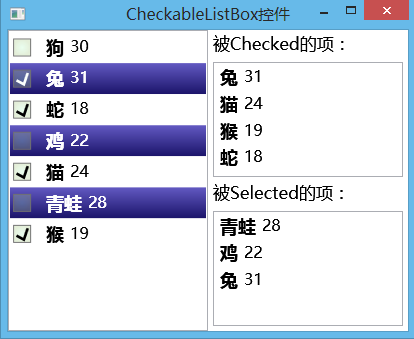
接下來就是測試一下控件。
<Grid>
    <Grid.ColumnDefinitions>
        <ColumnDefinition  />
        <ColumnDefinition  />
    </Grid.ColumnDefinitions>
    <local:CheckListBox x:Name="lb" Grid.Column="0" SelectionMode="Multiple"

ItemTemplate="{StaticResource stuTmp}"  />
    <Grid Grid.Column="1">
        <Grid.RowDefinitions>
            <RowDefinition Height="auto"  />
            <RowDefinition  />
            <RowDefinition Height="auto"  />
            <RowDefinition  />
        </Grid.RowDefinitions>
        <TextBlock Grid.Row="0" Text="被Checked的項:" FontSize="17" Margin="5,3,0,2"  />
        <ListBox Grid.Row="1" ItemsSource="{Binding Path=CheckedItems,ElementName=lb}" Margin="5"

ItemTemplate="{StaticResource stuTmp}"  />
        <TextBlock Grid.Row="2" Text="被Selected的項:" FontSize="17" Margin="5,0,0,2"  />
        <ListBox Grid.Row="3" Margin="5" ItemsSource="{Binding Path=SelectedItems,ElementName=lb}"

ItemTemplate="{StaticResource stuTmp}"  />
    </Grid>
</Grid>
lb.ItemsSource = new Student[]
{
    new Student{ Name="狗", Age=30 },
    new Student{ Name="兔", Age=31 },
    new Student{ Name="蛇", Age=18 },
    new Student{ Name="雞", Age=22 },
    new Student{ Name="貓", Age=24 },
    new Student{ Name="青蛙", Age=28 },
    new Student{ Name="猴", Age=19 }
};
代碼不完全,但主要的我都放出來了,隨後我把所有代碼都上傳到【資源】中,相當優惠,0積分下載。
下圖是最終的結果。