先來看一個不帶線程同步的例子,這個例子很簡單,只是讓兩個線程輸出同樣的內容,並不做其他的事, 所以,線程同步在這裡體現的並不明顯。
import java.util.Date;

public class ThreadTest extends Thread{
    int pauseTime;
    String name;

    /**
     * @param args
     */
    public static void main(String[] args) {
        // TODO Auto-generated method stub
        ThreadTest tT1 = new ThreadTest(1000, "Thread1");
        tT1.start();
        ThreadTest tT2 = new ThreadTest(3000, "Thread2");
        tT2.start();

    }
    public ThreadTest(int pauseTime , String name){
        this.pauseTime = pauseTime;
        this.name = name;
    }

    @Override
    public void run() {
        // TODO Auto-generated method stub
        super.run();
        while(true){
            try {
                System.out.println(name + ":"
                        + new Date(System.currentTimeMillis()));
                Thread.sleep(pauseTime);
            } catch (Exception e) {
                // TODO: handle exception
                e.printStackTrace();
            }
        }
    }

}
在來看一個多線程售票的問題,這個例子中體現線程同步的重要性 ,不保證這一點將會導致錯誤的執行結果
class TicketSouce implements Runnable
{
    //票的總數
    private int ticket=10;
    public void run()
    {
        for(int i=1;i<50;i++)
        {
            if(ticket>0)
            {
                //休眠1s秒中,為了使效果更明顯,否則可能出不了效果
                try {
                    Thread.sleep(1000);
                } catch (InterruptedException e) {
                    e.printStackTrace();
                }
                System.out.println(Thread.currentThread().getName()+"號窗口賣出"+this.ticket--+"

號票");
            }
        }
    }
}
public class Test {
    public static void main(String args[])
    {
        TicketSouce mt=new TicketSouce();
        //基於火車票創建三個窗口
        new Thread(mt,"1").start();
        new Thread(mt,"2").start();
        new Thread(mt,"3").start();
    }

}
輸出結果如下圖所示:
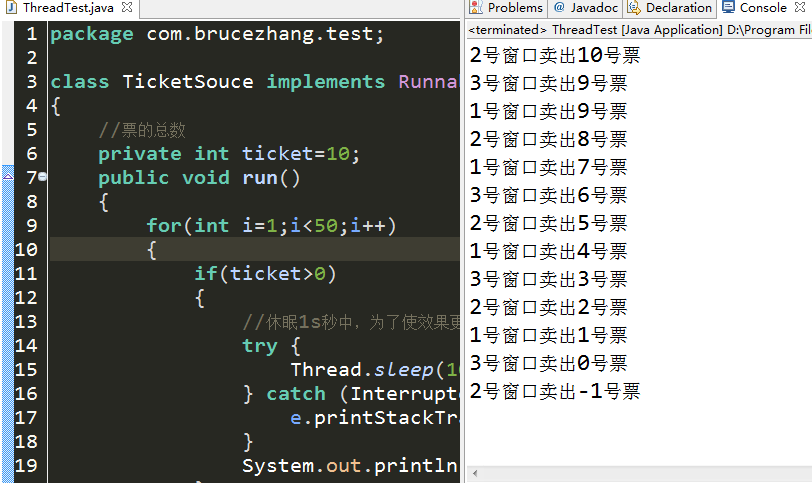
可以看到,輸出的結果並不是我們想要的,所以,需要線程同步的支持
當一個線程要使用火車票 這個資源時,我們就交給它一把鎖,等它把事情做完後在把鎖給另一個要用這個資源的線程。這樣就不會出現 上述情況。 實現這個鎖的功能就需要用到synchronized這個關鍵字。
synchronized這個關鍵字有兩種 用法1、放方法名前形成同步方法;2、放在塊前構成同步塊。
我們首先用第一種方法實現售票的功能 :
代碼如下:
class TicketSouce

implements Runnable
{
    //票的總數
    private int ticket=10;
    public void run()
    {
        for(int i=1;i<50;i++)
        {
            try {
                //休眠1s秒中,為了使效果更明顯,否則可能出不了效果
                Thread.sleep(1000);
            } catch (InterruptedException e) {
                e.printStackTrace();
            }
            this.sale();
        }
    }
    public synchronized void sale()
    {
            if(ticket>0)
            {
                System.out.println(Thread.currentThread().getName()+"號窗口賣出"+this.ticket--+"

號票");
            }
    }
}
public class Test {
    public static void main(String args[])
    {
        TicketSouce mt=new TicketSouce();
        //基於火車票創建三個窗口
        new Thread(mt,"a").start();
        new Thread(mt,"b").start();
        new Thread(mt,"c").start();
    }

}
第二種同步的方法如下:
class TicketSouce implements Runnable
{
    //票的總數
    private int ticket=10;
    public void run()
    {
        for(int i=1;i<50;i++)
        {
            synchronized(this){
                if(ticket>0)
                {
                    //休眠1s秒中,為了使效果更明顯,否則可能出不了效果
                    try {
                        Thread.sleep(1000);
                    } catch (InterruptedException e) {

                        e.printStackTrace();
                    }
                    System.out.println(Thread.currentThread().getName()+
                            "號窗口賣出" + this.ticket-- + "號票");
                }
                              }
        }
    }
}
public class ThreadTest {
    //主線程
    public static void main(String args[])
    {
        TicketSouce mt=new TicketSouce();
        //建立三個線程,同步操作
        new Thread(mt,"1").start();
        new Thread(mt,"2").start();
        new Thread(mt,"3").start();
    }

}
兩段程序輸出的結果如下所示:
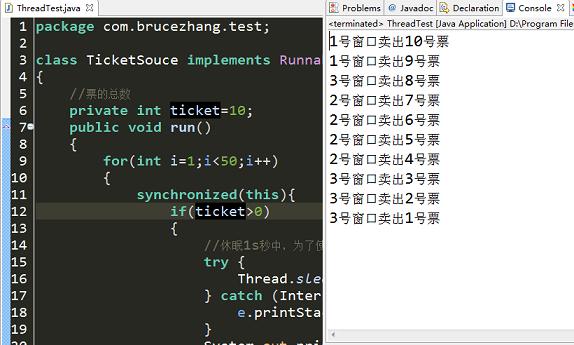
可以看到,兩段程序都有正確的輸出。
注意:同步關鍵字需要放對地方,否則可能出現不可預料的結果。